API Reference
Lookup
- class hebi.Lookup
Maintains a registry of network-connected modules and returns
hebi._internal.group.Groupobjects to the user.- DEFAULT_TIMEOUT_MS = 500
The default timeout (in milliseconds)
- property entrylist
A list of discovered network connected modules.
- Returns:
The list of modules
- Return type:
- get_connected_group_from_mac(address, timeout_ms=None)
Get a group from all modules known to connect to a module with the given mac address.
This is a blocking call which returns a Group with the given parameters. This will time out after
Lookup.DEFAULT_TIMEOUT_MSmilliseconds, if a matching group cannot be constructed.A mac address can be represented by a string or by a 6 element list of bytes:
grp1 = lookup.get_connected_group_from_mac('aa:bb:cc:dd:ee:ff')
grp2 = lookup.get_connected_group_from_mac([0, 0, 42, 42, 42, 42])
- Parameters:
address (str, list) – The mac address of the connected device, used to create the Group
timeout_ms (int, float) – The maximum amount of time to wait, in milliseconds. This is an optional parameter with a default value of
Lookup.DEFAULT_TIMEOUT_MS.
- Returns:
A group on success;
Noneif one or more devices specified could not be found- Return type:
- get_connected_group_from_name(family, name, timeout_ms=None)
Get a group from all modules known to connect to a module with the given name and family.
This is a blocking call which returns a Group with the given parameters. This will time out after
Lookup.DEFAULT_TIMEOUT_MSmilliseconds, if a matching group cannot be constructed.- Parameters:
family (str) – The family of the connected device, used to create the Group
name (str) – The name of the connected device, used to create the Group
timeout_ms (int, float) – The maximum amount of time to wait, in milliseconds. This is an optional parameter with a default value of
Lookup.DEFAULT_TIMEOUT_MS.
- Returns:
A group on success;
Noneif one or more devices specified could not be found- Return type:
- get_group_from_family(family: str, timeout_ms=None)
Get a group from all known modules with the given family.
This is a blocking call which returns a Group with the given parameters. This will time out after
Lookup.DEFAULT_TIMEOUT_MSmilliseconds, if a matching group cannot be constructed.- Parameters:
family (str) – The family of the devices to include in the Group
timeout_ms – The maximum amount of time to wait, in milliseconds. This is an optional parameter with a default value of
Lookup.DEFAULT_TIMEOUT_MS.
- Returns:
A group on success;
Noneif one or more devices specified could not be found- Return type:
- get_group_from_macs(addresses, timeout_ms=None)
Get a group from modules with the given mac addresses.
This is a blocking call which returns a Group with the given parameters. This will time out after
Lookup.DEFAULT_TIMEOUT_MSmilliseconds, if a matching group cannot be constructed.A mac address can be represented by a string or by a 6 element list of bytes:
grp1 = lookup.get_group_from_macs(['aa:bb:cc:dd:ee:ff'])
grp2 = lookup.get_group_from_macs([[0, 0, 42, 42, 42, 42]])
- Parameters:
addresses (list) – A list of mac addresses specifying the devices to include in the Group
timeout_ms – The maximum amount of time to wait, in milliseconds. This is an optional parameter with a default value of
Lookup.DEFAULT_TIMEOUT_MS.
- Returns:
A group on success;
Noneif one or more devices specified could not be found- Return type:
- get_group_from_names(families: str | list[str], names: str | list[str], timeout_ms: float | None = None)
Get a group from modules with the given names and families.
If the families or names provided as input is only a single element, then that element is assumed to pair with each item in the other parameter.
This is a blocking call which returns a Group with the given parameters. This will time out after
Lookup.DEFAULT_TIMEOUT_MSmilliseconds, if a matching group cannot be constructed.- Parameters:
families (string or list) – A family or list of families corresponding to the device(s) to include in the Group
names (string or list) – A name or list of names corresponding to the device(s) to include in the Group
timeout_ms – The maximum amount of time to wait, in milliseconds. This is an optional parameter with a default value of
Lookup.DEFAULT_TIMEOUT_MS.
- Returns:
A group on success;
Noneif one or more devices specified could not be found- Return type:
The following classes are used to retrieve information about modules discovered on the network.
Viewing Discovered Modules
- class hebi._internal.lookup.EntryList
A list of module entries.
This is used by the
Lookupclass and is returned byentrylist.It is a snapshot of the modules on the network when it was created, and behaves like a read-only list.
This class acts as an iterator for modules discovered on the network. The elements returned from the iterator are of type
Entry. To use, iterate in a loop like:for entry in lookup.entrylist: # print data, or gather information
Group
A group is the interface through which you can communicate with the modules
by sending commands and receiving data. Group commands are not created
directly - they are returned from methods in the Lookup class, as
well as from the create_imitation_group() function. An
imitation group can be created without any modules, mainly for testing
and prototyping purposes. See Imitation Group.
- class hebi._internal.group.Group
Represents a group of physical HEBI modules.
Allows Command, Feedback, and Info objects to be sent to and recieved from the hardware.
This is created internally.
Do not instantiate directly.
- DEFAULT_TIMEOUT_MS = 500
The default timeout (in milliseconds)
- add_feedback_handler(handler: Callable[[GroupFeedback], None])
Adds a handler function to be called by the internal feedback request thread.
Note that this function must execute very quickly: If a handler takes more time than the reciprocal of the feedback thread frequency, the thread will saturate in feedback events to dispatch. This may cause feedback packets to be dropped from handler dispatch, or delayed invocation of the feedback handlers.
- Parameters:
handler – A function which is able to accept a single argument
- clear_feedback_handlers()
Removes all feedback handlers presently added.
- property command_lifetime
The command lifetime for the modules in this group.
- Returns:
the command lifetime
- property feedback_frequency
The frequency of the internal feedback request + callback thread.
- Returns:
the frequency
- get_next_feedback(timeout_ms: float | None = None, reuse_fbk: GroupFeedback | None = None) GroupFeedback | None
Returns the most recently stored feedback from a sent feedback request, or the next one received (up to the requested timeout).
Note that a feedback request can be sent either with the send_feedback_request function, or by setting a background feedback frequency with
feedback_frequency.- Parameters:
timeout_ms (int) – The maximum amount of time to wait, in milliseconds. This is an optional parameter with a default value of
Group.DEFAULT_TIMEOUT_MS.reuse_fbk – An optional parameter which can be used to reuse an existing GroupFeedback instance. It is recommended to provide this parameter inside a repetitive loop, as reusing feedback instances results in substantially fewer heap allocations.
- Returns:
The most recent feedback, provided one became available before the timeout.
Noneis returned if there was no available feedback.
- log_user_state(v1: float | None = None, v2: float | None = None, v3: float | None = None, v4: float | None = None, v5: float | None = None, v6: float | None = None, v7: float | None = None, v8: float | None = None, v9: float | None = None) bool
Writes values to the active log as a UserState, which can be viewed in the Scope log viewer. If an error occurs while writing to the log, returns False.
- request_info(timeout_ms: float | None = None, reuse_info: GroupInfo | None = None)
Request info from the group, and store it in the passed-in info object.
- Parameters:
timeout_ms (int) – The maximum amount of time to wait, in milliseconds. This is an optional parameter with a default value of
Group.DEFAULT_TIMEOUT_MS.reuse_info (GroupInfo) – An optional parameter which can be used to reuse an existing GroupInfo instance. It is recommended to provide this parameter inside a repetitive loop, as reusing info instances results in substantially fewer heap allocations.
- Returns:
the updated info on success,
Noneotherwise- Return type:
- request_info_extra(timeout_ms: float | None = None, reuse_info: GroupInfo | None = None)
Request info from the group, and store it in the passed-in info object.
Extra info includes networking info, userdata, firmware info, and runtime data (seconds on / seconds commanded). These fields are not populated using the base request_info call to avoid excessive traffic on the network.
- Parameters:
timeout_ms (int) – The maximum amount of time to wait, in milliseconds. This is an optional parameter with a default value of
Group.DEFAULT_TIMEOUT_MS.reuse_info (GroupInfo) – An optional parameter which can be used to reuse an existing GroupInfo instance. It is recommended to provide this parameter inside a repetitive loop, as reusing info instances results in substantially fewer heap allocations.
- Returns:
the updated info on success,
Noneotherwise- Return type:
- send_command(group_command: GroupCommand)
Send a command to the given group without requesting an acknowledgement.
This is appropriate for high-frequency applications.
- Parameters:
group_command – The command to send
:return:
Trueif succeeded,Falseotherwise
- send_command_with_acknowledgement(group_command: GroupCommand, timeout_ms: int | None = None) bool
Send a command to the given group, requesting an acknowledgement of transmission to be sent back.
Note: A non-true return does not indicate a specific failure, and may result from an error while sending or simply a timeout/dropped response packet after a successful transmission.
- Parameters:
group_command – The command to send
timeout_ms – The maximum amount of time to wait, in milliseconds. This is an optional parameter with a default value of
Group.DEFAULT_TIMEOUT_MS.
- Returns:
Trueif succeeded,Falseotherwise
- send_feedback_request() bool
Requests feedback from the group.
Sends a background request to the modules in the group; if/when all modules return feedback, any associated handler functions are called. This returned feedback is also stored to be returned by the next call to
get_next_feedback()(any previously returned data is discarded).- Returns:
Trueif succeeded,Falseotherwise
- send_layout(*, layout_file: str, timeout_ms: int | None = None) bool
- send_layout(*, layout: list[dict], timeout_ms: int | None = None) bool
Send a layout configuration to the given group. Pass either layout_file or layout.
Note: A non-true return does not indicate a specific failure, and may result from an error while sending or simply a timeout/dropped response packet after a successful transmission.
- Parameters:
layout_file – The path of a layout file to send to MobileIO
layout – The contents of a layout file as a list of dictionaries
timeout_ms – The maximum amount of time to wait, in milliseconds. This is an optional parameter with a default value of
Group.DEFAULT_TIMEOUT_MS.
- Returns:
Trueif succeeded,Falseotherwise
- property size
The number of modules in the group.
- Returns:
size of the group
- start_log(directory: str | None = None, name: str | None = None, mkdirs: bool = False)
Start logging information and feedback from this group.
If a log file was already started before this (and not stopped using
stop_log()), then that file will be gracefully closed.Note that the directory folder must exist if mkdirs is not
True- Parameters:
directory (str) – Optional directory into which the log file will be created. If
None, the process’ current working directory is used.name (str) – Optional name of the log file. If
None, a name will be generated using the time at which this function was invoked.mkdirs (bool) – Optional flag denoting if the base path represented by directory should be created, if they do not exist
- Returns:
The path, including the file, of the log file. Never
None.- Return type:
- Raises:
IOError – If the group could not start logging
IPython Issues
Some IDE and development tools such as Jupyter Notebook and Spyder use a Python command shell called IPython. IPython is a very useful tool which unfortunately creates some subtle issues if used with this API.
Currently, the only known issue is when a script is run multiple times
while the user assigns a Group
object from the script into the running environment repetitively.
For example, assume the following commands are input within a running IPython instance:
In [1]: run ./your_script.py
In [2]: group1  # This is a group instance from your python script run above
Out[2]: <string representation of group1>
In [3]: run ./your_script.py
group1 is saved to a hidden variable in IPython named Out.
If the command at In [2] was not executed, there would be no leaking
of the group instance referenced by group1 -
rerunning the script would reference a different group and allow the original one to be disposed.
However, because group1 is saved to the dict named Out, it will stay alive until
it is explicitly deleted. This can become problematic if done repetitively, especially
if the groups have a high feedback frequency set.
One way to resolve this issue is to use a function called util.clear_all_groups().
This function explicitly disposes of all current group instances created by the API.
However, it is generally recommended that you ensure to not allow multiple group instances, which refer to the same modules, to be run simultaneously.
Kinematics
Robot Model
The Robot Model interface is used to create a kinematic body on which one can perform subsequent forward and inverse kinematics computations.
- class hebi.robot_model.RobotModel
Represents a chain or tree of robot elements (rigid bodies and joints).
Currently, only chains of elements are fully supported.
- add_actuator(actuator_type: str) bool
Add an element to the robot model with the kinematics/dynamics of an X or R series HEBI actuator.
- Parameters:
actuator_type – The type of actuator to add.
:return:
Trueif the actuator could be added,Falseotherwise.- Raises:
ValueError – If the string from
actuator_typeis invalidTypeError – If the
actuator_typeargument is not a string
- add_bracket(bracket_type: str, mount: str) bool
Add an element to the robot model with the kinematics/dynamics of a bracket between two actuators.
- Parameters:
bracket_type – The type of bracket to add.
mount – The mount type of the bracket
:return:
Trueif bracket was added,Falseotherwise- Raises:
ValueError – If the string from either
bracket_typeormountare invalidTypeError – If the either
bracket_typeormountarguments are not strings
- add_end_effector(end_effector_type: str, *, com: VectorType | None = None, inertia: VectorType | None = None, mass: float = 0.0, output: VectorType | None = None) bool
Add an end effector element to the robot model.
A “custom” type end effector can be given its own geometry (
com,inertia,massandoutput); by default it has identity transforms and zero mass and inertia.- Parameters:
end_effector_type – The type of end_effector to add.
com – (“custom” only) 3 element vector or 4x4 matrix: the transform to the center of mass, relative to the input frame, which is also the frame of the inertia tensor. A 3 element vector is used as the translation. Defaults to the identity.
inertia – (“custom” only) The 6 element inertia tensor (Ixx, Iyy, Izz, Ixy, Ixz, Iyz) in the center of mass frame. Defaults to zero (a point mass).
mass – (“custom” only) The mass of the end effector, in kg. Defaults to 0.
output – (“custom” only) 4x4 transform to the end effector’s output frame, relative to its input frame. Defaults to the identity.
:return:
Trueif the end effector was added,Falseotherwise- Raises:
ValueError – If the string from
end_effector_typeis invalid, if geometry is given for a type other than “custom”, or ifcom,inertiaoroutputhas the wrong sizeTypeError – If the
end_effector_typeargument is not a string
- add_joint(joint_type: str) bool
Adds a degree of freedom about the specified axis.
This does not represent an element with size or mass, but only a connection between two other elements about a particular axis.
- Parameters:
joint_type – The axis of rotation or translation about which this joint allows motion. For a linear joint, use:
tx,x,y,ty,tz, orzFor a rotation joint, use:rx,ry, orrzThis argument is case insensitive.- Raises:
ValueError – If the string from
joint_typeis invalidTypeError – If the
joint_typeargument is not a string
- add_link(link_type: str, extension: float, twist: float, input_type: str | LinkInputType = LinkInputType.RightAngle, output_type: str | LinkOutputType = LinkOutputType.RightAngle) bool
Add an element to the robot model with the kinematics/dynamics of a link between two actuators.
- Parameters:
link_type – The type of link between the actuators, e.g. a tube link between two X5 or X8 actuators.
extension – The center-to-center distance between the actuator rotational axes.
twist – The rotation (in radians) between the actuator axes of rotation. Note that a 0 radian rotation will result in a z-axis offset between the two actuators, and a pi radian rotation will result in the actuator interfaces to this tube being in the same plane, but the rotational axes being anti-parallel.
input_type – How the link attaches to the previous element:
'RightAngle'(the default) or'Inline', or aLinkInputTypevalue, as in HRDF.output_type – How the next element attaches to the link:
'RightAngle'(the default) or'Inline', or aLinkOutputTypevalue.
:return:
Trueif link was added,Falseotherwise- Raises:
ValueError – If the string from
link_type,input_typeoroutput_typeis invalidTypeError – If the
link_typeargument is not a string
- add_rigid_body(com, inertia, mass: float, output) bool
Adds a rigid body with the specified properties to the robot model.
This can be ‘combined’ with the parent element (the element to which this is attaching), which means that the mass, inertia, and output frames of this element will be integrated with the parent. The mass will be combined, and the reported parent output frame that this element attached to will be replaced with the output from this element (so that the number of output frames and masses remains constant).
Deprecation notice: It is deprecated to pass a str in as a parameter to any argument. This functionality will be removed in a future release.
- Parameters:
com (str, list, numpy.ndarray, ctypes.Array) – 3 element vector or 4x4 matrix. If this parameter is a 3 element vector, the elements will be used as the translation vector in a homogeneous transformation matrix. The homogeneous transform is to the center of mass location, relative to the input frame of the element. Note that this frame is also the frame in which the inertia tensor is given.
inertia (str, list, numpy.ndarray, ctypes.Array) – The 6 element representation (Ixx, Iyy, Izz, Ixy, Ixz, Iyz) of the inertia tensor, in the frame given by the COM.
mass – The mass of this element.
output (str, list, numpy.ndarray, ctypes.Array) – 4x4 matrix of the homogeneous transform to the output frame, relative to the input frame of the element.
- Returns:
Trueif the body could be added,Falseotherwise.- Raises:
ValueError – if com, inertia, or output are of wrong size
- property base_frame: NDArray[np.float64]
The transform from the world coordinate system to the root kinematic body.
- Returns:
The base frame 4x4 matrix
- property dof_count: int
The number of settable degrees of freedom in the kinematic tree.
This is equal to the number of actuators added.
- Returns:
the degrees of freedom.
- property element_count: int
The number of elements which compose the kinematic tree.
This is greater than or equal to the degrees of freedom.
- get_dynamic_comp_efforts(fbk_positions: NDArray[np.float64], cmd_positions: NDArray[np.float64], cmd_velocities: NDArray[np.float64], cmd_accels: NDArray[np.float64], dt=0.001, jacobians: NDArray[np.float64] | None = None, output: NDArray[np.float64] | None = None) NDArray[np.float64]
- Parameters:
fbk_positions
cmd_positions
cmd_velocities
cmd_accels
robot
dt
jacobians – Optionally pass in pre-computed jacobians for the fbk_position to avoid recomputing them. Should have dimensions (6 x dof x #frames)
- Returns:
- get_end_effector(positions: VectorType, output: NDArray[np.float64] | None = None) NDArray[np.float64]
Generates the forward kinematics to the end effector (leaf node)
Note: for center of mass frames, this is one per leaf node; for output frames, this is one per output per leaf node, in depth first order.
This method is for kinematic chains that only have a single leaf node frame.
- Parameters:
positions (list, numpy.ndarray, ctypes.Array) – A vector of joint positions/angles (in SI units of meters or radians) equal in length to the number of DoFs of the kinematic tree.
output – An optional parameter which allows you to avoid an allocation by copying the results into this parameter. It must be a writeable, C-contiguous float64 numpy array with 16 elements (e.g., a 4x4 matrix or 16 element array); otherwise
ValueErroris raised.
- Returns:
A 4x4 transform that is resized as necessary in the function and filled in with the homogeneous transform to the end effector frame.
- Raises:
RuntimeError – If the RobotModel has no output frames
ValueError – If the
positionsinput is not equal to the degrees of freedom of the RobotModel
- get_forward_kinematics(frame_type: str | FrameType, positions: VectorType, output: list[NDArray[np.float64]] | None = None) list[NDArray[np.float64]]
Generates the forward kinematics for the given robot model.
The order of the returned frames is in a depth-first tree.
As an example, assume a body A has one output, to which body B is connected. Body B has two outputs; actuator C is attached to the first output and actuator E is attached to the second output. Body D is attached to the only output of actuator C:
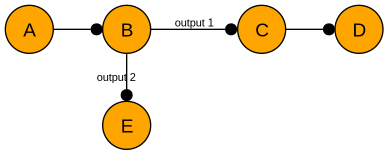
For center of mass frames, the returned frames would be A-B-C-D-E. For output frames, the returned frames would be A-B(1)-C-D-B(2)-E.
- Parameters:
frame_type – Which type of frame to consider. See
get_frame_count()for valid values.positions (list, numpy.ndarray, ctypes.Array) – A vector of joint positions/angles (in SI units of meters or radians) equal in length to the number of DoFs of the kinematic tree.
output – An optional parameter, which, if not
None, specifies a list into which to put the output frames. If this parameter is notNone, it must be large enough to fit all of the frames. No type or size checking is performed, and it is required that you handle error cases yourself.
- Returns:
An list of 4x4 transforms; this is resized as necessary in the function and filled in with the 4x4 homogeneous transform of each frame. Note that the number of frames depends on the frame type.
- Raises:
TypeError – If
frame_typeis not a stringValueError – If the
positionsinput is not equal to the degrees of freedom of the RobotModel
- get_forward_kinematics_mat(frame_type: str | FrameType, positions: VectorType, output: NDArray[np.float64] | None = None) NDArray[np.float64]
Generates the forward kinematics for the given robot model.
The order of the returned frames is in a depth-first tree.
- Parameters:
frame_type – Which type of frame to consider. See
get_frame_count()for valid values.positions (list, numpy.ndarray, ctypes.Array) – A vector of joint positions/angles (in SI units of meters or radians) equal in length to the number of DoFs of the kinematic tree.
output – An optional parameter, which, if not
None, specifies a numpy array into which to put the output frames. If this parameter is notNone, it must be a writeable, C-contiguous float64 array with room for exactly all of the frames (e.g. shape (frames x 4 x 4)); otherwiseValueErroris raised.
- Returns:
An numpy array (4 x 4 x frames) of 4x4 transforms; this is resized as necessary in the function and filled in with the 4x4 homogeneous transform of each frame. Note that the number of frames depends on the frame type.
- Raises:
TypeError – If
frame_typeis not a stringValueError – If the
positionsinput is not equal to the degrees of freedom of the RobotModel
- get_frame_count(frame_type: str | FrameType)
The number of frames in the forward kinematics.
- Note that this depends on the type of frame requested:
for center of mass frames, there is one per added body.
for output frames, there is one per output per body.
- Valid strings for valid frame types are:
For center of mass:
'CoM'or'com'For output:
'output'For input:
'input'
- Parameters:
frame_type – Which type of frame to consider
- Returns:
the number of frames of the specified type
- Raises:
ValueError – If the string/FrameType from
frame_typeis invalidTypeError – If the
frame_typeargument is not a string or FrameType
- get_grav_comp_efforts(positions: NDArray[np.float64], gravity: NDArray[np.floating[Any]], jacobians: NDArray[np.float64] | None = None, output: NDArray[np.float64] | None = None) NDArray[np.float64]
- Parameters:
positions
gravity
jacobians – Optionally pass in pre-computed jacobians for the desired position to avoid recomputing them. Should have dimensions (6 x dof x #frames)
output
- Returns:
- get_jacobian_end_effector(positions, output: NDArray[np.float64] | None = None) NDArray[np.float64]
Generates the Jacobian for the end effector (leaf node) frames(s).
Note: for center of mass frames, this is one per leaf node; for output frames, this is one per output per leaf node, in depth first order.
This method is for kinematic chains that only have a single leaf node frame.
- Parameters:
positions (list, numpy.ndarray, ctypes.Array) – A vector of joint positions/angles (in SI units of meters or radians) equal in length to the number of DoFs of the kinematic tree.
output – An optional parameter which allows you to avoid an allocation by copying the results into this parameter. It must be a writeable, C-contiguous float64 numpy array with (6 x dofs) elements; otherwise
ValueErroris raised.
- Returns:
A (6 x number of dofs) jacobian matrix for the corresponding end effector frame of reference on the robot. It is resized as necessary inside this function.
- Raises:
RuntimeError – If the RobotModel has no output frames
ValueError – If the
positionsinput is not equal to the degrees of freedom of the RobotModel
- get_jacobians(frame_type: str | FrameType, positions: VectorType, output: list[NDArray[np.float64]] | None = None) list[NDArray[np.float64]]
Generates the Jacobian for each frame in the given kinematic tree.
- Parameters:
frame_type – Which type of frame to consider. See
get_frame_count()for valid values.positions (list, numpy.ndarray, ctypes.Array) – A vector of joint positions/angles (in SI units of meters or radians) equal in length to the number of DoFs of the kinematic tree.
output – An optional parameter which allows you to avoid an allocation by copying the results into this parameter. The size of this parameter is not checked, so you must be certain that it is a list of the proper size with all numpy arrays of dtype
float(np.float64) with (frames x dofs) elements
- Returns:
A vector (length equal to the number of frames) of matrices; each matrix is a (6 x number of dofs) jacobian matrix for the corresponding frame of reference on the robot. It is resized as necessary inside this function.
- get_jacobians_mat(frame_type: str | FrameType, positions: VectorType, output: NDArray[np.float64] | None = None)
Generates the Jacobian for each frame in the given kinematic tree.
- Parameters:
frame_type – Which type of frame to consider. See
get_frame_count()for valid values.positions (list, numpy.ndarray, ctypes.Array) – A vector of joint positions/angles (in SI units of meters or radians) equal in length to the number of DoFs of the kinematic tree.
output – An optional parameter which allows you to avoid an allocation by copying the results into this parameter. It must be a writeable, C-contiguous float64 numpy array with (frames x 6 x dofs) elements; otherwise
ValueErroris raised.
- Returns:
A (6 x dofs x frames) numpy array containing the jacobian matrix for each frame of reference on the robot. It is resized as necessary inside this function.
- get_payload(*, index: int = 0, com_out: NDArray[np.float64] | None = None) float
Get the mass of an end effector’s payload.
Optionally, provide a 1x3 numpy array to get the center of mass offset of the payload
- Parameters:
index – The index of the end effector to retrieve payload information from. Defaults to 0
com_out – If provided, filled in place with the payload center of mass offset. Must have exactly 3 elements and be writeable and C-contiguous.
- Returns:
mass in kg of the end effector payload
- Raises:
Hebi_Exception – If there is no end effector with the provided index
ValueError – If
com_outdoes not meet these requirements
- property masses: NDArray[np.float64]
The mass of each rigid body (or combination of rigid bodies) in the robot.
- Returns:
The masses as an array
- property max_efforts: NDArray[np.float64]
The maximum effort of each degree of freedom in the robot.
- Returns:
The maximum efforts as an array
- property max_speeds: NDArray[np.float64]
The maximum speed of each degree of freedom in the robot.
- Returns:
The maximum speeds as an array
- property metadata: list
Retrieves a list of info about each individual element which composes this robot.
- set_payload(*, index: int = 0, mass: float | None = None, com: NDArray[np.float64] | None = None)
Set the mass and/or center of mass of an end effector’s payload.
- Parameters:
index – The index of the end effector to retrieve payload information from. Defaults to 0
mass – Optional argument, sets the end effector payload mass
com – Optional argument, sets the payload center of mass offset (any 3-element array-like)
- Raises:
Hebi_Exception – If there is no end effector with the provided index
ValueError – If
comdoes not have 3 elements
- solve_inverse_kinematics(initial_positions: VectorType, *objectives: _ObjectiveBase, **kwargs: Any) NDArray[np.float64]
Solves for an inverse kinematics solution given a set of objectives.
To avoid unnecessary allocations, provide
outputas a keyword argument. This argument must be a numpy array or matrix with dtypefloat(np.float64) with size equal to the initial positions. e.g.,robot.solve_inverse_kinematics(positions, obj1, obj2, output=calc_pos) # calc_pos.size == positions.size- Parameters:
initial_positions (list, numpy.ndarray, ctypes.Array) – The seed positions/angles (in SI units of meters or radians) from which to start the IK search; equal in length to the number of DoFs of the kinematic tree.
objectives – A variable number of objectives used to define the IK search (e.g., target end effector positions, etc). Each argument must have a base class of Objective.
kwargs – An optional keyword arguments map, which currently only allows an
outputargument
- Returns:
A vector equal in length to the number of DoFs of the kinematic tree; this will be filled in with the IK solution (in SI units of meters or radians) and resized as necessary.
- Raises:
HEBI_Exception – If the IK solver failed
TypeError – If any of the provided objectives are not an objective type
ValueError – If the
initial_positionsinput is not equal to the degrees of freedom of the RobotModel or has non-finite elements (_i.e_,nan,+/-inf)
HRDF Importing
- robot_model.import_from_hrdf(warning_callback: Callable[[Any], None] | None = None) RobotModel
Import a robot description in the HRDF format as a RobotModel instance.
Any warnings generated while importing will be printed to stderr, unless explicitly instructed otherwise by providing a callback.
- Parameters:
hrdf_file – The location of the HRDF file to import
warning_callback – A function, which can accept one argument, to call back if warnings are generated. If None, warnings are printed to stderr
- Returns:
the RobotModel from the description file
- Raises:
IOError – If the provided file does not exist
RuntimeError – If the hrdf file could not be imported. The associated error message will be displayed.
- robot_model.import_from_hrdf_string(warning_callback=None)
Provides same functionality as
import_from_hrdf(), but accepts a string representing the HRDF as opposed to a string to the file representing the HRDF.- Parameters:
hrdf_string – A string representing HRDF contents
Metadata
A RobotModel contains metadata for each component of the kinematic body.
Using the metadata property on an instance, one can retrieve a list of all metadata comprising the body.
All metadata elements are guaranteed to have the following properties:
type, which returns an enum value
is_dof, which returns a boolean
The type property returns an enum value corresponding to the type of element it represents. All possible values are:
hebi.robot_model.enums.RobotModelElementTypeActuator
hebi.robot_model.enums.RobotModelElementTypeBracket
hebi.robot_model.enums.RobotModelElementTypeJoint
hebi.robot_model.enums.RobotModelElementTypeLink
hebi.robot_model.enums.RobotModelElementTypeRigidBody
hebi.robot_model.enums.RobotModelElementTypeEndEffector
Using this property, you can determine what fields are present on a metadata object.
- class hebi.robot_model.OtherMetaData
Metadata pertaining to an unknown object.
- property is_dof: bool
- Returns:
Trueif this element corresponds to a degree of freedom;Falseotherwise
- property type
- Returns:
The enum value corresponding to this type
- class hebi.robot_model.ActuatorMetaData(actuator_type)
Metadata pertaining to an actuator.
- property actuator_type
- Returns:
The enum value corresponding to the specific actuator type of this element
- property is_dof: bool
- Returns:
Trueif this element corresponds to a degree of freedom;Falseotherwise
- property type
- Returns:
The enum value corresponding to this type
- class hebi.robot_model.BracketMetaData(bracket_type)
Metadata pertaining to a bracket.
- property bracket_type
- Returns:
The enum value corresponding to the specific bracket type of this element
- property is_dof: bool
- Returns:
Trueif this element corresponds to a degree of freedom;Falseotherwise
- property type
- Returns:
The enum value corresponding to this type
- class hebi.robot_model.JointMetaData(joint_type: int, gear_ratio: float = 1.0)
Metadata pertaining to a joint.
- property is_dof: bool
- Returns:
Trueif this element corresponds to a degree of freedom;Falseotherwise
- property joint_type
- Returns:
The enum value corresponding to the specific joint type of this element
- property type
- Returns:
The enum value corresponding to this type
- class hebi.robot_model.LinkMetaData(link_type: int, extension, twist)
Metadata pertaining to a link.
- property is_dof: bool
- Returns:
Trueif this element corresponds to a degree of freedom;Falseotherwise
- property link_type
- Returns:
The enum value corresponding to the specific link type of this element
- property type
- Returns:
The enum value corresponding to this type
- class hebi.robot_model.RigidBodyMetaData
Metadata pertaining to a rigid body.
- property is_dof: bool
- Returns:
Trueif this element corresponds to a degree of freedom;Falseotherwise
- property type
- Returns:
The enum value corresponding to this type
- class hebi.robot_model.EndEffectorMetaData(end_effector_type: int)
Metadata pertaining to an end effector.
- property end_effector_type
- Returns:
The enum value corresponding to the specific end effector type of this element
- property is_dof: bool
- Returns:
Trueif this element corresponds to a degree of freedom;Falseotherwise
- property type
- Returns:
The enum value corresponding to this type
Objective Functions
These functions are meant to be used with the
RobotModel IK solver.
- robot_model.endeffector_position_objective(weight: float = 1.0)
Create a position end effector objective with the given parameters. Analogous to EndEffectorPositionObjective. in the C++ API.
- Parameters:
xyz (list, numpy.ndarray, ctypes.Array) – list of x, y, and z position objective points
weight – The weight of the objective
- Returns:
the created objective
- Raises:
ValueError – if xyz does not have at least 3 elements
- robot_model.endeffector_so3_objective(weight: float = 1.0)
Create an SO3 end effector objective with the given parameters.
Analogous to EndEffectorSO3Objective. in the C++ API.
- Parameters:
rotation (list, numpy.ndarray, ctypes.Array) – SO3 rotation matrix
weight – The weight of the objective
- Returns:
the created objective
- Raises:
ValueError – if rotation matrix is not convertible to a 3x3 matrix, or if the rotation matrix is not in the SO(3) group.
- robot_model.endeffector_tipaxis_objective(weight: float = 1.0)
Create a tip axis end effector objective with the given parameters. Analogous to EndEffectorTipAxisObjective. in the C++ API.
- Parameters:
axis (list, numpy.ndarray, ctypes.Array) – list of x, y, and z tipaxis objective points
weight – The weight of the objective
- Returns:
the created objective
- Raises:
ValueError – if axis does not have at least 3 elements
- robot_model.joint_limit_constraint(maximum: VectorType, weight: float = 1.0, effect_range: float = 0.02)
Create a joint limit constraint objective.
Analogous to JointLimitConstraint. in the C++ API.
- Parameters:
minimum (str, list, numpy.ndarray, ctypes.Array)
maximum (str, list, numpy.ndarray, ctypes.Array)
weight – The weight of the objective
effect_range – How far (in radians) from each limit the constraint starts to push the joint back; it has no effect further inside the limits. Must be less than half of each joint’s range.
- Returns:
the created objective
- Raises:
ValueError – if minimum and maximum are not of the same size
- robot_model.custom_objective(func, user_data=None, weight=1.0)
Construct a custom objective using a provided function.
The func parameter is a function which accepts 3 parameters: positions, errors and user_data.
The first two parameters are guaranteed to be numpy arrays with dtype=np.float64. The third parameter, user_data, may be None, or set by the user when invoking this function. It is simply used to share application state with the callback function.
The length of errors in the callback will be equal to the num_errors parameter provided to this function. The elements in the errors parameter should be modified by the function to influence the IK solution.
The positions parameter is the joints positions (or angles) at the current point in the optimization. This is a read only array - any attempt to modify its elements will raise an Exception.
Example objective functions include:
def minimize(positions, error, user_data):
  error[0] = 0.0
  for i in range(len(positions)):
    error[0] += (positions[i]*positions[i])

def distance_to_sphere(positions, error, model):
  # model is a hebi.robot_model.RobotModel instance
  frame = model.get_forward_kinematics('endeffector', positions)[0]
  norm = np.linalg.norm(frame[0:3,3]) # translation vector in trasformation matrix
  sphere_radius = 0.25
  error[0] = (sphere_radius-norm)*(sphere_radius-norm)
- Parameters:
num_errors – The number of independent error values that this objective returns
func – The callback function
weight – The weight of the objective
- Returns:
the created objective
- Raises:
ValueError – if num_errors is less than 1
Trajectory Planning
Creating Trajectories
To create a trajectory, a simple interface is provided.
- hebi.trajectory.create_jerkazoidal_trajectory(start_position: float | ArrayLike, end_position: float | ArrayLike, const_speed: float | ArrayLike, start_ramp_time: float, end_ramp_time: float, start_velocity: float | ArrayLike | None = None, end_velocity: float | ArrayLike | None = None, start_acceleration: float | ArrayLike | None = None, end_acceleration: float | ArrayLike | None = None) _Trajectory
Creates a constant velocity trajectory with smooth ramp-up and ramp-down phases.
This function generates a multi-joint trajectory that follows a “jerkazoidal” velocity profile - similar to a trapezoidal velocity profile but with minimum-jerk ramp-up and ramp-down phases instead of constant acceleration. This produces smoother motion by maintaining a constant velocity between start and end positions, with smooth acceleration and deceleration phases at the beginning and end.
The trajectory consists of 2 to 4 waypoints depending on the ramp times: 1. Start position (with specified initial velocity and acceleration) 2. End of ramp-up phase (included only if start_ramp_time is sufficiently large) 3. Start of ramp-down phase (included only if constant velocity segment exists) 4. End position (with specified final velocity and acceleration)
All joints are synchronized to finish at the same time. The function computes the maximum constant velocity segment time required across all joints and uses this value for all joints to ensure coordination.
- Parameters:
start_position (float, list, numpy.ndarray) – Initial position for each joint (in SI units). Can be a scalar for single joint or array for multiple joints. Must have the same size as all other vector parameters.
end_position (float, list, numpy.ndarray) – Final position for each joint (in SI units). Must have the same size as start_position.
const_speed (float, list, numpy.ndarray) – Desired constant speed for each joint during the constant velocity phase (in SI units per second). All values must be positive and finite. Must have the same size as start_position.
start_ramp_time – Duration of the initial acceleration phase (in seconds). If very small or zero, the trajectory starts at constant velocity with no ramp-up. Must be non-negative and finite.
end_ramp_time – Duration of the final deceleration phase (in seconds). Must be positive and finite.
start_velocity (float, list, numpy.ndarray, None) – Optional initial velocity for each joint at the start of the trajectory (in SI units per second). If
None, defaults to zero velocity. Must be finite if provided.end_velocity (float, list, numpy.ndarray, None) – Optional final velocity for each joint at the end of the trajectory (in SI units per second). If
None, defaults to zero velocity. Must be finite if provided.start_acceleration (float, list, numpy.ndarray, None) – Optional initial acceleration for each joint at the start of the trajectory (in SI units per second squared). If
None, defaults to zero acceleration. Must be finite if provided.end_acceleration (float, list, numpy.ndarray, None) – Optional final acceleration for each joint at the end of the trajectory (in SI units per second squared). If
None, defaults to zero acceleration. Must be finite if provided.
- Returns:
A Trajectory object representing the constant velocity trajectory. This will never be
None.- Raises:
ValueError – If any of the following conditions are met: - Input vectors have mismatched sizes - Any input value is non-finite (NaN or infinity) - Any constant speed is not positive - end_ramp_time is not positive - The computed constant velocity segment time is negative (indicates invalid parameters)
HEBI_Exception – If the underlying C trajectory creation fails.
- hebi.trajectory.create_trajectory(time: ArrayLike, position: ArrayLike, velocity: ArrayLike | None = None, acceleration: ArrayLike | None = None) _Trajectory
Creates a smooth trajectory through a set of waypoints (position velocity and accelerations defined at particular times). This trajectory wrapper object can create multi-dimensional trajectories (i.e., multiple joints moving together using the same time reference).
- Parameters:
time (list, numpy.ndarray) – A vector of desired times at which to reach each waypoint; this must be defined (and not
Noneornanfor any element).position (list, numpy.ndarray, ctypes.Array) – A matrix of waypoint joint positions (in SI units). The number of rows should be equal to the number of joints, and the number of columns equal to the number of waypoints. Any elements that are
Noneornanwill be considered free parameters when solving for a trajectory. Values of+/-infare not allowed.velocity (NoneType, list, numpy.ndarray, ctypes.Array) – An optional matrix of velocity constraints at the corresponding waypoints; should either be
Noneor matching the size of the positions matrix. Any elements that areNoneornanwill be considered free parameters when solving for a trajectory. Values of+/-infare not allowed.acceleration (NoneType, list, numpy.ndarray, ctypes.Array) – An optional matrix of acceleration constraints at the corresponding waypoints; should either be
Noneor matching the size of the positions matrix. Any elements that areNoneornanwill be considered free parameters when solving for a trajectory. Values of+/-infare not allowed.
- Returns:
The trajectory. This will never be
None.- Raises:
ValueError – If dimensionality or size of any input parameters are invalid.
RuntimeError – If trajectory could not be created.
- hebi.trajectory.segment_times_to_waypoint_times(segment_times: ArrayLike) NDArray[np.float64]
Converts segment times to a vector of time values at each waypoint. The first element of the vector is the time at which the trajectory starts is always zero.
The first element of the vector is the time at which the trajectory starts is always zero.
- Parameters:
segment_times (list, numpy.ndarray) – A vector of segment times (in seconds), where each element represents the duration of a segment between waypoints. Must contain at least one element and all values must be finite (and not
Noneornan).- Returns:
A vector of waypoint times. This will never be
None.- Raises:
ValueError – If segment times vector is empty (less than one element) or if any of the segment times are not finite.
- hebi.trajectory.waypoint_times_to_segment_times(waypoint_times: ArrayLike) NDArray[np.float64]
Converts waypoint times to a vector of duration values for each segment between waypoints.
- Parameters:
waypoint_times (list, numpy.ndarray) – A vector of waypoint times (in seconds), where each element represents the time at which a waypoint is reached. Must contain at least two elements and all elements must be finite (and not
Noneornan).- Returns:
A vector of segment times. This will never be
None.- Raises:
ValueError – If size of the waypoint times vector is less than two or if any of the waypoint times are not finite.
Trajectory Objects
- class hebi._internal.trajectory.Trajectory
Represents a smooth trajectory through a set of waypoints.
- property duration
The time (in seconds) between the start and end of this trajectory.
- Returns:
the duration
- Return type:
- property end_time
The time (in seconds) at which the trajectory ends.
- Returns:
the end time
- Return type:
- get_state(time: float, *, position: NDArray[np.float64] | None = None, velocity: NDArray[np.float64] | None = None, acceleration: NDArray[np.float64] | None = None) tuple[NDArray[np.float64], NDArray[np.float64], NDArray[np.float64]]
Returns the position, velocity, and acceleration for a given point in time along the trajectory.
- Parameters:
time – the time, in seconds
acceleration (position, velocity,) – optional arrays to fill in. Each must be a writeable array; it is resized in place to the number of joints if needed.
- Returns:
a triplet containing the position, velocity, and acceleration at the given point in time.
- Raises:
ValueError – if an output array isn’t a writeable float64 numpy array, or can’t be resized in place (e.g. it’s a view, or other references to it exist)
- property number_of_joints
The number of joints in this trajectory.
- Returns:
the number of joints
- Return type:
- property number_of_waypoints
The number of waypoints in this trajectory.
- Returns:
number of waypoints
- Return type:
- rescale(scale: float) None
Rescales the trajectory in time by the given scale factor. Values > 1.0 make the trajectory take longer, while values < 1.0 make it take less time.
- Raises:
ValueError – if scale is not a finite, positive value
HEBI_Exception – if rescaling the trajectory fails
- rescale_with_limits(velocity_limits: NDArray[np.float64] | None, acceleration_limits: NDArray[np.float64] | None) None
Attempts to rescale the trajectory to be within the provided velocity and acceleration limits.
Fixed position, velocity, and acceleration waypoints used to generate the trajectory will be maintained. If these waypoints are above the limits provided to this function, them waypoints will be cropped to the maximums provided.
Note that this uses a heuristic to rescale, and will not precisely match the provided limits.
Also note that the trajectory may be slowed to be within these limits, but is never sped up.
- Raises:
HEBI_Exception – if rescaling the trajectory fails
- property start_time
The time (in seconds) at which the trajectory starts.
- Returns:
the start time
- Return type:
- property waypoint_times
- Returns:
The input time (in seconds) for each waypoint
- Return type:
Arm
The arm API is a high level interface intended to be used with robotic chains which have a simple (i.e., non-tree) topology. As the name suggests, this interface is best suited for robotic arms. This API encapsulates the module communication and kinematic description, while also exposing a few tunables and state associated with common kit use cases.
Components
Arm
- class hebi.arm.Arm(time_getter: Callable[[], float], group: Group, robot_model: RobotModel, end_effector: EndEffector | None = None)
- FK(positions: VectorType, **kwargs: Any)
Retrieves the output frame of the end effector at the provided joint positions.
The keys provided below show the possible retrievable representations of the resulting end effector transform.
- Possible keys:
- xyz_out: Used to store the 3d translation vector of the end effector
If this is set, this is also the object returned.
tip_axis_out: Used to store the tip axis of the end effector
orientation_out: Used to store the orientation (SO3 matrix) of the end effector
- Parameters:
positions – The joint space positions
- Returns:
The 3d translation vector of the end effector
- add_plugin(plugin: ArmPlugin)
Adds the specified plugin to the arm, if not previously added.
ArmPlugin.on_associated()callback is invoked on the plugin specified.- Parameters:
plugin – the plugin to add
- cancel_goal()
Removes any currently set goal.
- property end_effector: EndEffector | Gripper | None
The currently set end effector.
Noneif there is no end effector.
- get_aux(t: float) NDArray[np.float64]
Retrieve the aux value at the given time point.
If there are no aux values, an empty array is returned.
- Parameters:
t – The point in time, intended to be within the interval determined by the current goal.
- get_plugin_by_name(name: str) ArmPlugin | None
Gets the plugin by the specified name.
- Parameters:
name – The name of the plugin to get.
- Returns:
The plugin with the specified name if it exists, otherwise None.
- get_plugin_by_type(plugin_type: type) ArmPlugin | None
Gets the plugin by the specified type.
- Parameters:
plugin_type – The type of the plugin to get
- Returns:
The plugin of the specified type if it exists, otherwise None
- ik_target_xyz(initial_position, target_xyz, out=None)
Solve for the joint space positions such that the end effector is near the target xyz position in space specified.
If there are any joint limits set, the solver will attempt to respect them.
- Parameters:
initial_position – The seed angles for the IK solver
target_xyz – The intended destination coordinate as a 3d vector
out – The optional output parameter (also always returned)
- ik_target_xyz_so3(initial_position: VectorType, target_xyz: VectorType, orientation: NDArray[np.float64], out: NDArray[np.float64] | None = None)
Solve for the joint space positions such that the end effector is near the target xyz position in space with the specified SO3 orientation.
If there are any joint limits set, the solver will attempt to respect them.
- Parameters:
initial_position – The seed angles for the IK solver
target_xyz – The intended destination coordinate as a 3d vector
orientation – The intended destination orientation as an SO3 matrix
out – The optional output parameter (also always returned)
- ik_target_xyz_tip_axis(initial_position: VectorType, target_xyz: VectorType, tip_axis: VectorType, out: NDArray[np.float64] | None = None)
Solve for the joint space positions such that the end effector is near the target xyz position in space and also oriented along the axis specified.
If there are any joint limits set, the solver will attempt to respect them.
- Parameters:
initial_position – The seed angles for the IK solver
target_xyz – The intended destination coordinate as a 3d vector
tip_axis – The intended destination tip axis as a 3d vector
out – The optional output parameter (also always returned)
- property robot_model: RobotModel
The underlying robot description of the arm.
Guaranteed to be non-null.
- send() bool
Send the pending commands to the arm and end effector (if non-null).
- :return:
Trueif command was successfully sent to all components;False otherwise
- :return:
- set_end_effector(end_effector: EndEffector)
Update the currently set end effector for the arm.
- set_goal(goal: Goal)
Sets the current goal of the arm as described by the input waypoints.
- Parameters:
goal – Goal object representing waypoints of the goal
- set_velocity_limits_from_model()
Set velocity limits from the robot model’s maximum speeds.
- solve_ik(initial_position: VectorType, target_xyz: VectorType, *, out: NDArray[np.float64] | None = None)
- solve_ik(initial_position: VectorType, target_xyz: VectorType, *, tip_axis: VectorType, out: NDArray[np.float64] | None = None)
- solve_ik(initial_position: VectorType, target_xyz: VectorType, *, orientation: NDArray[np.float64], out: NDArray[np.float64] | None = None)
Solve for joint space positions so that the target element (defaults to the end effector) meets the list of provided conditions.
If there are any joint limits set, the solver will attempt to respect them.
- Parameters:
initial_position – The seed angles for the IK solver
target_xyz – The intended destination coordinate as a 3d vector
tip_axis – The intended destination tip direction as a 3d vector
orientation – The intended destination orientation as an SO3 matrix
out – The optional output parameter (also always returned)
End Effector
An arm can optionally have an end effector associated with it.
- class hebi.arm.EndEffector
Abstract base class representing an end effector to be used with an Arm object.
- class hebi.arm.Gripper(group: Group, close_effort: float, open_effort: float)
End effector implementation which is intended to be used to provide gripper functionality.
- close()
Sets the gripper to be fully closed.
- property command: GroupCommand
The underlying command to be sent to the gripper. Can be modified to extend functionality.
- load_gains(gains_file: str, attempts: int = 5) bool
Load the gains from the provided file and send the gains to the gripper.
This method requests acknowledgement from the gripper that the gains were received. Consequently, this method may take a few seconds to execute if you are on a network which drops packets (e.g., a suboptimal WiFi network). The attempts parameter is used to re-send the gains, in the event that an ack was not received from the gripper.
- Parameters:
gains_file – The file location of the gains file
attempts – the number of attempts to send the gains to the gripper.
:return:
Trueif gains were successfully sent to the gripper; otherwiseFalse
- open()
Sets the gripper to be fully open.
- send()
Send the command to the gripper.
- Returns:
the result of
hebi._internal.group.Group.send_command()
- toggle()
Toggle the state of the gripper.
If the gripper was fully closed, it will become fully open. If the gripper was fully open, it will become fully closed. Otherwise, this method is a no-op.
- update(aux: float | NDArray[np.float64])
Update the state of the gripper.
- Parameters:
aux (int, float, numpy.ndarray) – The aux data. Can be a scalar value or a list of values. If a list, it is expected to contain only one element. Values be finite.
:return:
Trueon success;Falseotherwise
Plugins
Plugins provide extra functionality for the arm, through an interface which
is essentially a collection of callbacks invoked by the arm on certain methods.
To add a plugin to an existing arm, one can simply add it via arm.Arm.add_plugin().
- class hebi.arm.ArmPlugin(name: str | None = None, enabled: bool = True, ramp_time: float = 0.0)
Abstract base class representing a plugin to be used for an Arm object.
- property enabled: bool
Determines if the plugin should be invoked by the owning arm. If
False, this plugin will not be invoked onArm.update().
- on_associated(arm: Arm)
Override to update any state based on the associated arm.
Invoked when the instance is added to an arm via
Arm.add_plugin()
Some plugin implementations are provided:
- class hebi.arm.EffortOffset(*, offset: NDArray[float32], **kwargs)
Plugin implementation used to offset the effort to be sent to the group.
This offset can be scalar or a vector of length equal to the size of the group.
- class hebi.arm.ImpedanceController(*, gains_in_end_effector_frame: bool = False, **kwargs)
Plugin implementation which provides an impedance controller for the arm.
- on_associated(arm: Arm)
Override to update any state based on the associated arm.
Invoked when the instance is added to an arm via
Arm.add_plugin()
- set_i_clamp(x: float, y: float, z: float, roll: float, pitch: float, yaw: float)
Sets the clamping values for the wrench produced by the impedance controller integrator. Units are (N) or (Nm).
- set_kd(x: float, y: float, z: float, roll: float, pitch: float, yaw: float)
Sets the damping gains for the impedance controller. Units are (N/(m/sec)) or (Nm/(rad/sec)).
- set_ki(x: float, y: float, z: float, roll: float, pitch: float, yaw: float)
Sets the integral gains for the impedance controller. Units are (N/(m*sec)) or (Nm/(rad*sec)).
Creating an Arm Object
- arm.create(names: list[str] | None = None, command_lifetime: float = 100, control_frequency: float = 100.0, hrdf_file: str | None = None, robot_model: RobotModel | None = None, end_effector: EndEffector | None = None, time_getter: Callable[[], float] | None = None, lookup: Lookup | None = None, setup_default_plugins: bool = True) Arm
Create an arm object based off of the provided kinematic representation.
Examples:
import hebi
from hebi import arm as arm_api

# Create based off of a 6-DoF arm with an HRDF file
arm1 = arm_api.create(["Example Arm"],
                      names=['J1_base', 'J2_shoulder', 'J3_elbow', 'J4_wrist1', 'J5_wrist2', 'J6_wrist3'],
                      hrdf_file="hrdf/A-2085-06.hrdf")

# Use some existing objects
lookup = hebi.Lookup()
existing_robot_model = get_robot_model()
families = get_families()
names = get_names()
time_function = get_simulator_time_function()

arm2 = arm_api.create(families=families, names=names,
                      robot_model=existing_robot_model,
                      time_getter=time_function,
                      lookup=lookup)
- Parameters:
families – The family or families of the modules in the group. If multiple families are provided, they must be in the same order as the names of the modules.
names – Names of the modules in the group. If
None,hebi.Lookup.get_group_from_family()will be usedcommand_lifetime – How long a command takes effect for on the robot before expiring (ms).
control_frequency – Loop rate, in Hz. This is how fast the arm update loop will nominally run.
hrdf_file – The robot description. Cannot be used in combination with
robot_model.robot_model – The robot description. Cannot be used in combination with
hrdf_file.end_effector – Optionally, supply an end effector to be controlled by the “aux” state of provided goals.
time_getter – A function pointer which returns a float representing the current time in seconds. Can be overloaded to use, e.g., simulator time
lookup – An optional lookup instance to use to find the group. The default instance will be provided if
Nonesetup_default_plugins – Whether to set up default plugins (Gravity and Dynamics compensation) for the arm.
Utility Functions and Objects
Miscellaneous functions which don’t fall under any other category appear here.
Logging
Opening a Log File
Log File Objects
- class hebi._internal.log_file.LogFile
Represents a file which contains previously recorded group messages.
This is created internally.
Do not instantiate directly.
- property feedback_iterate
Retrieves an iterator over feedback from the LogFile, sequentially in order from the beginning of the file.
Note: The object returned from this method is only valid for the duration of the enclosing LogFile (self). If one attempts to use this iterator after the LogFile has been disposed, an exception will be raised.
- Returns:
A feedback iterator for this LogFile.
- class hebi._internal.log_file.TimedGroupFeedback
A feedback object with a time field.
Represents feedback returned from a log file. This class inherits all fields and functionality from
GroupFeedback.- property time
- Returns:
The time, relative to the start of the log file (in seconds).
- Return type:
Mobile IO
Notice: This API is considered experimental and may change in ways which may break backwards compatibility in future versions.
Creating a MobileIO Instance
- util.create_mobile_io(family='HEBI', name='mobileIO')
Create a
hebi._internal.mobile_io.MobileIOinstance with the specified family and name.- Parameters:
lookup (hebi.Lookup) – An existing lookup instance to use to look for the mobile device
family (str) – The family of the mobile IO device
name (str) – The name of the mobile IO device
- Returns:
the mobile IO instance, or None on failure
- Return type:
Mobile IO Classes
- class hebi._internal.mobile_io.MobileIO(group: Group)
Wrapper around a mobile IO controller.
- add_text(message: str, blocking: bool = True)
Append a message to the text display.
- Parameters:
- Return type:
- Returns:
Trueif the device received the command and successfully sent an acknowledgement;Falseotherwise.
- get_axis_state(index: int) float
Retrieve the current state of the specified axis.
Note that this method uses 1-indexing.
- get_button_diff(index: int)
Retrieve the current diff of the specified button.
Note that this method uses 1-indexing.
- get_button_state(index: int)
Retrieve the current (pressed/unpressed) state of the specified button.
Note that this method uses 1-indexing.
- get_last_feedback()
Retrieve the last receieved feedback from the mobile IO device.
- Return type:
hebi._internal.ffi._message_types.Feedback
- property orientation
Retrieve the AR orientation of the mobile IO device.
Note that this will only return valid data if the device supports an AR framework.
- Return type:
- property position
Retrieve the AR position of the mobile IO device.
Note that this will only return valid data if the device supports an AR framework.
- Return type:
- resetUI()
Resets button and axis values and state to defaults. Returns
Falseif feedback could not be received.- Return type:
- Returns:
Trueon success;Falseotherwise
- send_layout(*, layout_file: str | None = None, layout=None, timeout_ms: int | None = None)
Sends a new layout configuration to the mobileIO device. Either pass the path to a json file as
layout_file, or a Python object representing the json structure aslayout
- send_vibrate(blocking: bool = True)
Send a command to vibrate the device. Note that this feature depends on device support. If the device does not support programmatic vibrating, then this will be a no-op.
- set_axis_value(slider: int, value: float)
Set the position on a slider.
Note that this method uses 1-indexing.
- set_button_mode(button: int, value: int | str)
Set the mode of the specified button to momentary or toggle.
Note that this method uses 1-indexing.
- Parameters:
- Raises:
ValueError – If value is an unrecognized string
- Return type:
- Returns:
Trueif the device received the command and successfully sent an acknowledgement;Falseotherwise.
- set_button_output(button: int, value: int)
Set the button output behavior (indicator ring on or off).
Note that this method uses 1-indexing.
- Parameters:
- Return type:
- Returns:
Trueif the device received the command and successfully sent an acknowledgement;Falseotherwise.
- set_led_color(color: Color | int | str, blocking: bool = True)
Set the edge led color.
- Parameters:
- Return type:
- Returns:
Trueif the device received the command and successfully sent an acknowledgement;Falseotherwise.
Imitation Group
An imitation group is an instance of a Group
which provides all of the same methods and attributes of a group
representing a physically connected collection of HEBI modules
on a local network. However, the imitation group differs in implementation
due to the fact that it represents a virtual collection of modules.
- util.create_imitation_group()
Create an imitation group of the provided size. The imitation group returned from this function provides the exact same interface as a group created from the
Lookupclass.However, there are a few subtle differences between the imitation group and group returned from a lookup operation. See Contrasted to Physical Group section for more information.
- Parameters:
size (int) – The number of modules in the imitation group
- Returns:
The imitation group. This will never be
None- Return type:
- Raises:
ValueError – If size is less than 1
Contrasted to Physical Group
For simplicity, think of the “physical” group returned from a lookup operation as a PhysicalGroup and the imitation group returned from this function as an ImitationGroup.
Commands
While both interfaces allow for commands to be sent, there is no network communication involved in the ImitationGroup implementation. Consequently, any commands sent to an imitation group will be visible immediately.
For example:
group = create_imitation_group(3)
print('Position:')
# Prints [0.0, 0.0, 0.0]
print(group.get_next_feedback().position)
# Move modules in group
cmd = GroupCommand(group.size)
cmd.position = [4.0, 2.0, -2.0]
# Send command, which will be visible immediately
group.send_command(cmd)
# Prints [4.0, 2.0, -2.0]
print(group.get_next_feedback().position)
Info
An ImitationGroup will never return info. In fact, any calls to
Group.request_info() will return None. A PhysicalGroup should always
return valid info.
Feedback
An ImitationGroup will always have feedback available - i.e., calling
Group.get_next_feedback() on an ImitationGroup will always return feedback
immediately. In contrast, a PhysicalGroup requires a non-zero feedback
frequency, or the Group.send_feedback_request() function to be called. To achieve
some level of deterministic behavior, the feedback in an ImitationGroup
is always set to an initial state, which is basically a set of sane values
for each field in a GroupFeedback object.
Therefore, the following code is valid with the imitation group:
group = create_imitation_group(3)
print('3 Positions:')
# Prints the same position 3 times ([0.0, 0.0, 0.0])
print(group.get_next_feedback().position)
print(group.get_next_feedback().position)
print(group.get_next_feedback().position)
The default feedback frequency for an imitation group is 0. This means that any attached feedback handlers will not be invoked when the object is in its initial state. You must explicitly set the feedback frequency to a positive number if feedback handlers are desired. Remember that unless commands are actively being set, the feedback data will be the same exact value on every feedback handler invocation.
Misc Group Utilities
- util.clear_all_groups()
Clear all groups currently allocated by the API.
This is useful to clear up resources when running in an environment such as IPython.
Message Types
These classes are used to communicate with HEBI modules. With the exception of
GroupCommand, they are read-only.
Commanding
- class hebi.GroupCommand(number_of_modules: int, shared=None)
Command objects have various fields that can be set; when sent to the module, these fields control internal properties and setpoints.
-
property accel_includes_gravity: NDArray[np.bool_]Units: None
Whether to include acceleration due to gravity in acceleration feedback.
-
property boot: NDArray[np.bool_]Type: flag
Units: None Boot the module from bootloader into application.
- clear()
Clears all of the fields.
-
property clear_log: NDArray[np.bool_]Type: flag
Units: None Clears the log message on the module.
-
property control_strategy: NDArray[np.int32]Type: enum
Units: None How the position, velocity, and effort PID loops are connected in order to control motor PWM.
Possible values include:
Off(raw value:0): The motor is not given power (equivalent to a 0 PWM value)DirectPWM(raw value:1): A direct PWM value (-1 to 1) can be sent to the motor (subject to onboard safety limiting).Strategy2(raw value:2): A combination of the position, velocity, and effort loops with P and V feeding to T; documented on docs.hebi.us under “Control Modes”Strategy3(raw value:3): A combination of the position, velocity, and effort loops with P, V, and T feeding to PWM; documented on docs.hebi.us under “Control Modes”Strategy4(raw value:4): A combination of the position, velocity, and effort loops with P feeding to T and V feeding to PWM; documented on docs.hebi.us under “Control Modes”
- copy_from(src: GroupCommand)
Copies all fields from the provided message.
All fields in the current message are cleared before copied from src.
- create_view(mask: list[int]) GroupCommandView
Creates a view into this instance with the indices as specified.
Note that the created view will hold a strong reference to this object. This means that this object will not be destroyed until the created view is also destroyed.
For example:
# group_command has a size of at least 4
indices = [0, 1, 2, 3]
view = group_command.create_view(indices)
# use view like a GroupCommand object
- property debug
Values for internal debug functions (channel 1-9 available).
-
property effort: NDArray[np.float32]Units: N*m
Effort at the module output; units vary (e.g., N * m for rotational joints and N for linear stages).
-
property effort_d_on_error: NDArray[np.bool_]Units: None
Controls whether the Kd term uses the “derivative of error” or “derivative of measurement.” When the setpoints have step inputs or are noisy, setting this to @c false can eliminate corresponding spikes or noise in the output.
-
property effort_dead_zone: NDArray[np.float32]Units: None
Error values within +/- this value from zero are treated as zero (in terms of computed proportional output, input to numerical derivative, and accumulated integral error).
-
property effort_feed_forward: NDArray[np.float32]Units: None
Feed forward term for effort (this term is multiplied by the target and added to the output).
-
property effort_i_clamp: NDArray[np.float32]Units: None
Maximum allowed value for the output of the integral component of the PID loop; the integrated error is not allowed to exceed value that will generate this number.
-
property effort_kd: NDArray[np.float32]Units: None
Derivative PID gain for effort.
-
property effort_ki: NDArray[np.float32]Units: None
Integral PID gain for effort.
-
property effort_kp: NDArray[np.float32]Units: None
Proportional PID gain for effort.
-
property effort_limit_max: NDArray[np.float32]Units: N*m
The firmware safety limit for the maximum allowed effort.
-
property effort_limit_min: NDArray[np.float32]Units: N*m
The firmware safety limit for the minimum allowed effort.
-
property effort_max_output: NDArray[np.float32]Units: None
Output from the PID controller is limited to a maximum of this value.
-
property effort_max_target: NDArray[np.float32]Units: None
Maximum allowed value for input to the PID controller.
-
property effort_min_output: NDArray[np.float32]Units: None
Output from the PID controller is limited to a minimum of this value.
-
property effort_min_target: NDArray[np.float32]Units: None
Minimum allowed value for input to the PID controller.
-
property effort_output_lowpass: NDArray[np.float32]Units: None
A simple lowpass filter applied to the controller output; needs to be between 0 and 1. At each timestep: x_t = x_t * a + x_{t-1} * (1 - a).
-
property effort_punch: NDArray[np.float32]Units: None
Constant offset to the effort PID output outside of the deadzone; it is added when the error is positive and subtracted when it is negative.
-
property effort_target_lowpass: NDArray[np.float32]Units: None
A simple lowpass filter applied to the target set point; needs to be between 0 and 1. At each timestep: x_t = x_t * a + x_{t-1} * (1 - a).
-
property family: list[str | None]Units: None
The family for this module. The string must be null-terminated and less than 21 characters.
-
property force: NDArray[np.float32]Type: vector3f
Units: Newton Cartesian force data, such as to a haptic device.
- property has_accel_includes_gravity: NDArray[np.bool_]
Whether the
accel_includes_gravityfield is set, for each module.Getters return the field’s last stored value even when it is not set (e.g. after setting it to
None), so use this to check whether a value is present.
- property has_append_log: NDArray[np.bool_]
Whether the
append_logfield is set, for each module.Getters return the field’s last stored value even when it is not set (e.g. after setting it to
None), so use this to check whether a value is present.
- property has_boot: NDArray[np.bool_]
Whether the
bootfield is set, for each module.Getters return the field’s last stored value even when it is not set (e.g. after setting it to
None), so use this to check whether a value is present.
- property has_clear_log: NDArray[np.bool_]
Whether the
clear_logfield is set, for each module.Getters return the field’s last stored value even when it is not set (e.g. after setting it to
None), so use this to check whether a value is present.
- property has_control_strategy: NDArray[np.bool_]
Whether the
control_strategyfield is set, for each module.Getters return the field’s last stored value even when it is not set (e.g. after setting it to
None), so use this to check whether a value is present.
- property has_effort: NDArray[np.bool_]
Whether the
effortfield is set, for each module.Getters return the field’s last stored value even when it is not set (e.g. after setting it to
None), so use this to check whether a value is present.
- property has_effort_d_on_error: NDArray[np.bool_]
Whether the
effort_d_on_errorfield is set, for each module.Getters return the field’s last stored value even when it is not set (e.g. after setting it to
None), so use this to check whether a value is present.
- property has_effort_dead_zone: NDArray[np.bool_]
Whether the
effort_dead_zonefield is set, for each module.Getters return the field’s last stored value even when it is not set (e.g. after setting it to
None), so use this to check whether a value is present.
- property has_effort_feed_forward: NDArray[np.bool_]
Whether the
effort_feed_forwardfield is set, for each module.Getters return the field’s last stored value even when it is not set (e.g. after setting it to
None), so use this to check whether a value is present.
- property has_effort_i_clamp: NDArray[np.bool_]
Whether the
effort_i_clampfield is set, for each module.Getters return the field’s last stored value even when it is not set (e.g. after setting it to
None), so use this to check whether a value is present.
- property has_effort_kd: NDArray[np.bool_]
Whether the
effort_kdfield is set, for each module.Getters return the field’s last stored value even when it is not set (e.g. after setting it to
None), so use this to check whether a value is present.
- property has_effort_ki: NDArray[np.bool_]
Whether the
effort_kifield is set, for each module.Getters return the field’s last stored value even when it is not set (e.g. after setting it to
None), so use this to check whether a value is present.
- property has_effort_kp: NDArray[np.bool_]
Whether the
effort_kpfield is set, for each module.Getters return the field’s last stored value even when it is not set (e.g. after setting it to
None), so use this to check whether a value is present.
- property has_effort_limit_max: NDArray[np.bool_]
Whether the
effort_limit_maxfield is set, for each module.Getters return the field’s last stored value even when it is not set (e.g. after setting it to
None), so use this to check whether a value is present.
- property has_effort_limit_min: NDArray[np.bool_]
Whether the
effort_limit_minfield is set, for each module.Getters return the field’s last stored value even when it is not set (e.g. after setting it to
None), so use this to check whether a value is present.
- property has_effort_max_output: NDArray[np.bool_]
Whether the
effort_max_outputfield is set, for each module.Getters return the field’s last stored value even when it is not set (e.g. after setting it to
None), so use this to check whether a value is present.
- property has_effort_max_target: NDArray[np.bool_]
Whether the
effort_max_targetfield is set, for each module.Getters return the field’s last stored value even when it is not set (e.g. after setting it to
None), so use this to check whether a value is present.
- property has_effort_min_output: NDArray[np.bool_]
Whether the
effort_min_outputfield is set, for each module.Getters return the field’s last stored value even when it is not set (e.g. after setting it to
None), so use this to check whether a value is present.
- property has_effort_min_target: NDArray[np.bool_]
Whether the
effort_min_targetfield is set, for each module.Getters return the field’s last stored value even when it is not set (e.g. after setting it to
None), so use this to check whether a value is present.
- property has_effort_output_lowpass: NDArray[np.bool_]
Whether the
effort_output_lowpassfield is set, for each module.Getters return the field’s last stored value even when it is not set (e.g. after setting it to
None), so use this to check whether a value is present.
- property has_effort_punch: NDArray[np.bool_]
Whether the
effort_punchfield is set, for each module.Getters return the field’s last stored value even when it is not set (e.g. after setting it to
None), so use this to check whether a value is present.
- property has_effort_target_lowpass: NDArray[np.bool_]
Whether the
effort_target_lowpassfield is set, for each module.Getters return the field’s last stored value even when it is not set (e.g. after setting it to
None), so use this to check whether a value is present.
- property has_family: NDArray[np.bool_]
Whether the
familyfield is set, for each module.Getters return the field’s last stored value even when it is not set (e.g. after setting it to
None), so use this to check whether a value is present.
- property has_force: NDArray[np.bool_]
Whether the
forcefield is set, for each module.Getters return the field’s last stored value even when it is not set (e.g. after setting it to
None), so use this to check whether a value is present.
- property has_led: NDArray[np.bool_]
Whether the
ledfield is set, for each module.Getters return the field’s last stored value even when it is not set (e.g. after setting it to
None), so use this to check whether a value is present.
- property has_max_position_limit_strategy: NDArray[np.bool_]
Whether the
max_position_limit_strategyfield is set, for each module.Getters return the field’s last stored value even when it is not set (e.g. after setting it to
None), so use this to check whether a value is present.
- property has_min_position_limit_strategy: NDArray[np.bool_]
Whether the
min_position_limit_strategyfield is set, for each module.Getters return the field’s last stored value even when it is not set (e.g. after setting it to
None), so use this to check whether a value is present.
- property has_motor_foc_id: NDArray[np.bool_]
Whether the
motor_foc_idfield is set, for each module.Getters return the field’s last stored value even when it is not set (e.g. after setting it to
None), so use this to check whether a value is present.
- property has_motor_foc_iq: NDArray[np.bool_]
Whether the
motor_foc_iqfield is set, for each module.Getters return the field’s last stored value even when it is not set (e.g. after setting it to
None), so use this to check whether a value is present.
- property has_motor_foc_vd: NDArray[np.bool_]
Whether the
motor_foc_vdfield is set, for each module.Getters return the field’s last stored value even when it is not set (e.g. after setting it to
None), so use this to check whether a value is present.
- property has_motor_foc_vq: NDArray[np.bool_]
Whether the
motor_foc_vqfield is set, for each module.Getters return the field’s last stored value even when it is not set (e.g. after setting it to
None), so use this to check whether a value is present.
- property has_mstop_strategy: NDArray[np.bool_]
Whether the
mstop_strategyfield is set, for each module.Getters return the field’s last stored value even when it is not set (e.g. after setting it to
None), so use this to check whether a value is present.
- property has_name: NDArray[np.bool_]
Whether the
namefield is set, for each module.Getters return the field’s last stored value even when it is not set (e.g. after setting it to
None), so use this to check whether a value is present.
- property has_offset_reference_position: NDArray[np.bool_]
Whether the
offset_reference_positionfield is set, for each module.Getters return the field’s last stored value even when it is not set (e.g. after setting it to
None), so use this to check whether a value is present.
- property has_position: NDArray[np.bool_]
Whether the
positionfield is set, for each module.Getters return the field’s last stored value even when it is not set (e.g. after setting it to
None), so use this to check whether a value is present.
- property has_position_d_on_error: NDArray[np.bool_]
Whether the
position_d_on_errorfield is set, for each module.Getters return the field’s last stored value even when it is not set (e.g. after setting it to
None), so use this to check whether a value is present.
- property has_position_dead_zone: NDArray[np.bool_]
Whether the
position_dead_zonefield is set, for each module.Getters return the field’s last stored value even when it is not set (e.g. after setting it to
None), so use this to check whether a value is present.
- property has_position_feed_forward: NDArray[np.bool_]
Whether the
position_feed_forwardfield is set, for each module.Getters return the field’s last stored value even when it is not set (e.g. after setting it to
None), so use this to check whether a value is present.
- property has_position_i_clamp: NDArray[np.bool_]
Whether the
position_i_clampfield is set, for each module.Getters return the field’s last stored value even when it is not set (e.g. after setting it to
None), so use this to check whether a value is present.
- property has_position_kd: NDArray[np.bool_]
Whether the
position_kdfield is set, for each module.Getters return the field’s last stored value even when it is not set (e.g. after setting it to
None), so use this to check whether a value is present.
- property has_position_ki: NDArray[np.bool_]
Whether the
position_kifield is set, for each module.Getters return the field’s last stored value even when it is not set (e.g. after setting it to
None), so use this to check whether a value is present.
- property has_position_kp: NDArray[np.bool_]
Whether the
position_kpfield is set, for each module.Getters return the field’s last stored value even when it is not set (e.g. after setting it to
None), so use this to check whether a value is present.
- property has_position_limit_max: NDArray[np.bool_]
Whether the
position_limit_maxfield is set, for each module.Getters return the field’s last stored value even when it is not set (e.g. after setting it to
None), so use this to check whether a value is present.
- property has_position_limit_min: NDArray[np.bool_]
Whether the
position_limit_minfield is set, for each module.Getters return the field’s last stored value even when it is not set (e.g. after setting it to
None), so use this to check whether a value is present.
- property has_position_max_output: NDArray[np.bool_]
Whether the
position_max_outputfield is set, for each module.Getters return the field’s last stored value even when it is not set (e.g. after setting it to
None), so use this to check whether a value is present.
- property has_position_max_target: NDArray[np.bool_]
Whether the
position_max_targetfield is set, for each module.Getters return the field’s last stored value even when it is not set (e.g. after setting it to
None), so use this to check whether a value is present.
- property has_position_min_output: NDArray[np.bool_]
Whether the
position_min_outputfield is set, for each module.Getters return the field’s last stored value even when it is not set (e.g. after setting it to
None), so use this to check whether a value is present.
- property has_position_min_target: NDArray[np.bool_]
Whether the
position_min_targetfield is set, for each module.Getters return the field’s last stored value even when it is not set (e.g. after setting it to
None), so use this to check whether a value is present.
- property has_position_output_lowpass: NDArray[np.bool_]
Whether the
position_output_lowpassfield is set, for each module.Getters return the field’s last stored value even when it is not set (e.g. after setting it to
None), so use this to check whether a value is present.
- property has_position_punch: NDArray[np.bool_]
Whether the
position_punchfield is set, for each module.Getters return the field’s last stored value even when it is not set (e.g. after setting it to
None), so use this to check whether a value is present.
- property has_position_target_lowpass: NDArray[np.bool_]
Whether the
position_target_lowpassfield is set, for each module.Getters return the field’s last stored value even when it is not set (e.g. after setting it to
None), so use this to check whether a value is present.
- property has_reference_effort: NDArray[np.bool_]
Whether the
reference_effortfield is set, for each module.Getters return the field’s last stored value even when it is not set (e.g. after setting it to
None), so use this to check whether a value is present.
- property has_reference_position: NDArray[np.bool_]
Whether the
reference_positionfield is set, for each module.Getters return the field’s last stored value even when it is not set (e.g. after setting it to
None), so use this to check whether a value is present.
- property has_reset: NDArray[np.bool_]
Whether the
resetfield is set, for each module.Getters return the field’s last stored value even when it is not set (e.g. after setting it to
None), so use this to check whether a value is present.
- property has_save_current_settings: NDArray[np.bool_]
Whether the
save_current_settingsfield is set, for each module.Getters return the field’s last stored value even when it is not set (e.g. after setting it to
None), so use this to check whether a value is present.
- property has_spring_constant: NDArray[np.bool_]
Whether the
spring_constantfield is set, for each module.Getters return the field’s last stored value even when it is not set (e.g. after setting it to
None), so use this to check whether a value is present.
- property has_stop_boot: NDArray[np.bool_]
Whether the
stop_bootfield is set, for each module.Getters return the field’s last stored value even when it is not set (e.g. after setting it to
None), so use this to check whether a value is present.
- property has_torque: NDArray[np.bool_]
Whether the
torquefield is set, for each module.Getters return the field’s last stored value even when it is not set (e.g. after setting it to
None), so use this to check whether a value is present.
- property has_user_settings_bytes1: NDArray[np.bool_]
Whether the
user_settings_bytes1field is set, for each module.Getters return the field’s last stored value even when it is not set (e.g. after setting it to
None), so use this to check whether a value is present.
- property has_user_settings_bytes2: NDArray[np.bool_]
Whether the
user_settings_bytes2field is set, for each module.Getters return the field’s last stored value even when it is not set (e.g. after setting it to
None), so use this to check whether a value is present.
- property has_user_settings_bytes3: NDArray[np.bool_]
Whether the
user_settings_bytes3field is set, for each module.Getters return the field’s last stored value even when it is not set (e.g. after setting it to
None), so use this to check whether a value is present.
- property has_user_settings_bytes4: NDArray[np.bool_]
Whether the
user_settings_bytes4field is set, for each module.Getters return the field’s last stored value even when it is not set (e.g. after setting it to
None), so use this to check whether a value is present.
- property has_user_settings_bytes5: NDArray[np.bool_]
Whether the
user_settings_bytes5field is set, for each module.Getters return the field’s last stored value even when it is not set (e.g. after setting it to
None), so use this to check whether a value is present.
- property has_user_settings_bytes6: NDArray[np.bool_]
Whether the
user_settings_bytes6field is set, for each module.Getters return the field’s last stored value even when it is not set (e.g. after setting it to
None), so use this to check whether a value is present.
- property has_user_settings_bytes7: NDArray[np.bool_]
Whether the
user_settings_bytes7field is set, for each module.Getters return the field’s last stored value even when it is not set (e.g. after setting it to
None), so use this to check whether a value is present.
- property has_user_settings_bytes8: NDArray[np.bool_]
Whether the
user_settings_bytes8field is set, for each module.Getters return the field’s last stored value even when it is not set (e.g. after setting it to
None), so use this to check whether a value is present.
- property has_user_settings_float1: NDArray[np.bool_]
Whether the
user_settings_float1field is set, for each module.Getters return the field’s last stored value even when it is not set (e.g. after setting it to
None), so use this to check whether a value is present.
- property has_user_settings_float2: NDArray[np.bool_]
Whether the
user_settings_float2field is set, for each module.Getters return the field’s last stored value even when it is not set (e.g. after setting it to
None), so use this to check whether a value is present.
- property has_user_settings_float3: NDArray[np.bool_]
Whether the
user_settings_float3field is set, for each module.Getters return the field’s last stored value even when it is not set (e.g. after setting it to
None), so use this to check whether a value is present.
- property has_user_settings_float4: NDArray[np.bool_]
Whether the
user_settings_float4field is set, for each module.Getters return the field’s last stored value even when it is not set (e.g. after setting it to
None), so use this to check whether a value is present.
- property has_user_settings_float5: NDArray[np.bool_]
Whether the
user_settings_float5field is set, for each module.Getters return the field’s last stored value even when it is not set (e.g. after setting it to
None), so use this to check whether a value is present.
- property has_user_settings_float6: NDArray[np.bool_]
Whether the
user_settings_float6field is set, for each module.Getters return the field’s last stored value even when it is not set (e.g. after setting it to
None), so use this to check whether a value is present.
- property has_user_settings_float7: NDArray[np.bool_]
Whether the
user_settings_float7field is set, for each module.Getters return the field’s last stored value even when it is not set (e.g. after setting it to
None), so use this to check whether a value is present.
- property has_user_settings_float8: NDArray[np.bool_]
Whether the
user_settings_float8field is set, for each module.Getters return the field’s last stored value even when it is not set (e.g. after setting it to
None), so use this to check whether a value is present.
- property has_velocity: NDArray[np.bool_]
Whether the
velocityfield is set, for each module.Getters return the field’s last stored value even when it is not set (e.g. after setting it to
None), so use this to check whether a value is present.
- property has_velocity_d_on_error: NDArray[np.bool_]
Whether the
velocity_d_on_errorfield is set, for each module.Getters return the field’s last stored value even when it is not set (e.g. after setting it to
None), so use this to check whether a value is present.
- property has_velocity_dead_zone: NDArray[np.bool_]
Whether the
velocity_dead_zonefield is set, for each module.Getters return the field’s last stored value even when it is not set (e.g. after setting it to
None), so use this to check whether a value is present.
- property has_velocity_feed_forward: NDArray[np.bool_]
Whether the
velocity_feed_forwardfield is set, for each module.Getters return the field’s last stored value even when it is not set (e.g. after setting it to
None), so use this to check whether a value is present.
- property has_velocity_i_clamp: NDArray[np.bool_]
Whether the
velocity_i_clampfield is set, for each module.Getters return the field’s last stored value even when it is not set (e.g. after setting it to
None), so use this to check whether a value is present.
- property has_velocity_kd: NDArray[np.bool_]
Whether the
velocity_kdfield is set, for each module.Getters return the field’s last stored value even when it is not set (e.g. after setting it to
None), so use this to check whether a value is present.
- property has_velocity_ki: NDArray[np.bool_]
Whether the
velocity_kifield is set, for each module.Getters return the field’s last stored value even when it is not set (e.g. after setting it to
None), so use this to check whether a value is present.
- property has_velocity_kp: NDArray[np.bool_]
Whether the
velocity_kpfield is set, for each module.Getters return the field’s last stored value even when it is not set (e.g. after setting it to
None), so use this to check whether a value is present.
- property has_velocity_limit_max: NDArray[np.bool_]
Whether the
velocity_limit_maxfield is set, for each module.Getters return the field’s last stored value even when it is not set (e.g. after setting it to
None), so use this to check whether a value is present.
- property has_velocity_limit_min: NDArray[np.bool_]
Whether the
velocity_limit_minfield is set, for each module.Getters return the field’s last stored value even when it is not set (e.g. after setting it to
None), so use this to check whether a value is present.
- property has_velocity_max_output: NDArray[np.bool_]
Whether the
velocity_max_outputfield is set, for each module.Getters return the field’s last stored value even when it is not set (e.g. after setting it to
None), so use this to check whether a value is present.
- property has_velocity_max_target: NDArray[np.bool_]
Whether the
velocity_max_targetfield is set, for each module.Getters return the field’s last stored value even when it is not set (e.g. after setting it to
None), so use this to check whether a value is present.
- property has_velocity_min_output: NDArray[np.bool_]
Whether the
velocity_min_outputfield is set, for each module.Getters return the field’s last stored value even when it is not set (e.g. after setting it to
None), so use this to check whether a value is present.
- property has_velocity_min_target: NDArray[np.bool_]
Whether the
velocity_min_targetfield is set, for each module.Getters return the field’s last stored value even when it is not set (e.g. after setting it to
None), so use this to check whether a value is present.
- property has_velocity_output_lowpass: NDArray[np.bool_]
Whether the
velocity_output_lowpassfield is set, for each module.Getters return the field’s last stored value even when it is not set (e.g. after setting it to
None), so use this to check whether a value is present.
- property has_velocity_punch: NDArray[np.bool_]
Whether the
velocity_punchfield is set, for each module.Getters return the field’s last stored value even when it is not set (e.g. after setting it to
None), so use this to check whether a value is present.
- property has_velocity_target_lowpass: NDArray[np.bool_]
Whether the
velocity_target_lowpassfield is set, for each module.Getters return the field’s last stored value even when it is not set (e.g. after setting it to
None), so use this to check whether a value is present.
-
property ioType: ioBank
Units: n/a Interface to the IO pins of the module.
This field exposes a mutable view of all banks -
a,b,c,d,e,f- which all have one or more pins. Each pin hasintandfloatvalues. The two values are not the same view into a piece of data and thus can both be set to different values.Examples:
a2 = cmd.io.a.get_int(2)
e4 = cmd.io.e.get_float(4)
cmd.io.a.set_int(1, 42)
cmd.io.e.set_float(4, 13.0)
-
property ledType: led
Units: n/a The module’s LED.
You can retrieve or set the LED color through this interface. The underlying object has a field
colorwhich can be set using an integer or string. For example:cmd.led.color = 'red' cmd.led.color = 0xFF0000
The available string colors are
red
green
blue
black
white
cyan
magenta
yellow
transparent
-
property max_position_limit_strategy: NDArray[np.int32]Type: enum
Units: None The position limit strategy (at the maximum position) for the actuator.
Possible values include:
HoldPosition(raw value:0): Exceeding the position limit results in the actuator holding the position. Needs to be manually set to ‘disabled’ to recover.DampedSpring(raw value:1): Exceeding the position limit results in a virtual spring that pushes the actuator back to within the limits.MotorOff(raw value:2): Exceeding the position limit results in the control strategy being set to ‘off’. Remains ‘off’ until changed by user.Disabled(raw value:3): Exceeding the position limit has no effect.
-
property min_position_limit_strategy: NDArray[np.int32]Type: enum
Units: None The position limit strategy (at the minimum position) for the actuator.
Possible values include:
HoldPosition(raw value:0): Exceeding the position limit results in the actuator holding the position. Needs to be manually set to ‘disabled’ to recover.DampedSpring(raw value:1): Exceeding the position limit results in a virtual spring that pushes the actuator back to within the limits.MotorOff(raw value:2): Exceeding the position limit results in the control strategy being set to ‘off’. Remains ‘off’ until changed by user.Disabled(raw value:3): Exceeding the position limit has no effect.
-
property motor_foc_id: NDArray[np.float32]Units: A
The i_d command term of the field-oriented control loop running on the motor.
-
property motor_foc_iq: NDArray[np.float32]Units: A
The i_q command term of the field-oriented control loop running on the motor.
-
property motor_foc_vd: NDArray[np.float32]Units: V
The v_d command term of the field-oriented control loop running on the motor.
-
property motor_foc_vq: NDArray[np.float32]Units: V
The v_q command term of the field-oriented control loop running on the motor.
-
property mstop_strategy: NDArray[np.int32]Type: enum
Units: None The motion stop strategy for the actuator.
Possible values include:
Disabled(raw value:0): Triggering the M-Stop has no effect.MotorOff(raw value:1): Triggering the M-Stop results in the control strategy being set to ‘off’. Remains ‘off’ until changed by user.HoldPosition(raw value:2): Triggering the M-Stop results in the motor holding the motor position. Operations resume to normal once trigger is released.
-
property name: list[str | None]Units: None
The name for this module. The string must be null-terminated and less than 21 characters.
-
property offset_reference_position: NDArray[np.float32]Units: rad
Offset the internal encoder reference offset so that the current position changes by the given reference offset command.
-
property position: NDArray[np.float64]Type: highResAngle
Units: rad Position of the module output (post-spring).
-
property position_d_on_error: NDArray[np.bool_]Units: None
Controls whether the Kd term uses the “derivative of error” or “derivative of measurement.” When the setpoints have step inputs or are noisy, setting this to @c false can eliminate corresponding spikes or noise in the output.
-
property position_dead_zone: NDArray[np.float32]Units: None
Error values within +/- this value from zero are treated as zero (in terms of computed proportional output, input to numerical derivative, and accumulated integral error).
-
property position_feed_forward: NDArray[np.float32]Units: None
Feed forward term for position (this term is multiplied by the target and added to the output).
-
property position_i_clamp: NDArray[np.float32]Units: None
Maximum allowed value for the output of the integral component of the PID loop; the integrated error is not allowed to exceed value that will generate this number.
-
property position_kd: NDArray[np.float32]Units: None
Derivative PID gain for position.
-
property position_ki: NDArray[np.float32]Units: None
Integral PID gain for position.
-
property position_kp: NDArray[np.float32]Units: None
Proportional PID gain for position.
-
property position_limit_max: NDArray[np.float64]Type: highResAngle
Units: rad The firmware safety limit for the maximum allowed position.
-
property position_limit_min: NDArray[np.float64]Type: highResAngle
Units: rad The firmware safety limit for the minimum allowed position.
-
property position_max_output: NDArray[np.float32]Units: None
Output from the PID controller is limited to a maximum of this value.
-
property position_max_target: NDArray[np.float32]Units: None
Maximum allowed value for input to the PID controller.
-
property position_min_output: NDArray[np.float32]Units: None
Output from the PID controller is limited to a minimum of this value.
-
property position_min_target: NDArray[np.float32]Units: None
Minimum allowed value for input to the PID controller.
-
property position_output_lowpass: NDArray[np.float32]Units: None
A simple lowpass filter applied to the controller output; needs to be between 0 and 1. At each timestep: x_t = x_t * a + x_{t-1} * (1 - a).
-
property position_punch: NDArray[np.float32]Units: None
Constant offset to the position PID output outside of the deadzone; it is added when the error is positive and subtracted when it is negative.
-
property position_target_lowpass: NDArray[np.float32]Units: None
A simple lowpass filter applied to the target set point; needs to be between 0 and 1. At each timestep: x_t = x_t * a + x_{t-1} * (1 - a).
- read_gains(file: str)
Import the gains from a file into this object.
- Raises:
IOError if the file could not be opened for reading
- read_safety_params(file: str)
Import the safety params from a file into this object.
- Raises:
IOError if the file could not be opened for reading
-
property reference_effort: NDArray[np.float32]Units: N*m
Set the internal effort reference offset so that the current effort matches the given reference command.
-
property reference_position: NDArray[np.float32]Units: rad
Set the internal encoder reference offset so that the current position matches the given reference command.
-
property reset: NDArray[np.bool_]Type: flag
Units: None Restart the module.
-
property save_current_settings: NDArray[np.bool_]Type: flag
Units: None Indicates if the module should save the current values of all of its settings.
- property size
The number of modules in this group message.
-
property spring_constant: NDArray[np.float32]Units: N/m
The spring constant of the module.
-
property stop_boot: NDArray[np.bool_]Type: flag
Units: None Stop the module from automatically booting into application.
-
property torque: NDArray[np.float32]Type: vector3f
Units: Newton-meter Cartesian torque data, such as to a haptic device.
-
property user_settings_bytes1: list[str | None]Units: None
Sets the value of the user setting bytes field “1”.
-
property user_settings_bytes2: list[str | None]Units: None
Sets the value of the user setting bytes field “2”.
-
property user_settings_bytes3: list[str | None]Units: None
Sets the value of the user setting bytes field “3”.
-
property user_settings_bytes4: list[str | None]Units: None
Sets the value of the user setting bytes field “4”.
-
property user_settings_bytes5: list[str | None]Units: None
Sets the value of the user setting bytes field “5”.
-
property user_settings_bytes6: list[str | None]Units: None
Sets the value of the user setting bytes field “6”.
-
property user_settings_bytes7: list[str | None]Units: None
Sets the value of the user setting bytes field “7”.
-
property user_settings_bytes8: list[str | None]Units: None
Sets the value of the user setting bytes field “8”.
-
property user_settings_float1: NDArray[np.float32]Units: ???
Sets the value of the user setting float field “1”.
-
property user_settings_float2: NDArray[np.float32]Units: ???
Sets the value of the user setting float field “2”.
-
property user_settings_float3: NDArray[np.float32]Units: ???
Sets the value of the user setting float field “3”.
-
property user_settings_float4: NDArray[np.float32]Units: ???
Sets the value of the user setting float field “4”.
-
property user_settings_float5: NDArray[np.float32]Units: ???
Sets the value of the user setting float field “5”.
-
property user_settings_float6: NDArray[np.float32]Units: ???
Sets the value of the user setting float field “6”.
-
property user_settings_float7: NDArray[np.float32]Units: ???
Sets the value of the user setting float field “7”.
-
property user_settings_float8: NDArray[np.float32]Units: ???
Sets the value of the user setting float field “8”.
-
property velocity: NDArray[np.float32]Units: rad/s
Velocity of the module output (post-spring).
-
property velocity_d_on_error: NDArray[np.bool_]Units: None
Controls whether the Kd term uses the “derivative of error” or “derivative of measurement.” When the setpoints have step inputs or are noisy, setting this to @c false can eliminate corresponding spikes or noise in the output.
-
property velocity_dead_zone: NDArray[np.float32]Units: None
Error values within +/- this value from zero are treated as zero (in terms of computed proportional output, input to numerical derivative, and accumulated integral error).
-
property velocity_feed_forward: NDArray[np.float32]Units: None
Feed forward term for velocity (this term is multiplied by the target and added to the output).
-
property velocity_i_clamp: NDArray[np.float32]Units: None
Maximum allowed value for the output of the integral component of the PID loop; the integrated error is not allowed to exceed value that will generate this number.
-
property velocity_kd: NDArray[np.float32]Units: None
Derivative PID gain for velocity.
-
property velocity_ki: NDArray[np.float32]Units: None
Integral PID gain for velocity.
-
property velocity_kp: NDArray[np.float32]Units: None
Proportional PID gain for velocity.
-
property velocity_limit_max: NDArray[np.float32]Units: rad/s
The firmware safety limit for the maximum allowed velocity.
-
property velocity_limit_min: NDArray[np.float32]Units: rad/s
The firmware safety limit for the minimum allowed velocity.
-
property velocity_max_output: NDArray[np.float32]Units: None
Output from the PID controller is limited to a maximum of this value.
-
property velocity_max_target: NDArray[np.float32]Units: None
Maximum allowed value for input to the PID controller.
-
property velocity_min_output: NDArray[np.float32]Units: None
Output from the PID controller is limited to a minimum of this value.
-
property velocity_min_target: NDArray[np.float32]Units: None
Minimum allowed value for input to the PID controller.
-
property velocity_output_lowpass: NDArray[np.float32]Units: None
A simple lowpass filter applied to the controller output; needs to be between 0 and 1. At each timestep: x_t = x_t * a + x_{t-1} * (1 - a).
-
property velocity_punch: NDArray[np.float32]Units: None
Constant offset to the velocity PID output outside of the deadzone; it is added when the error is positive and subtracted when it is negative.
-
property velocity_target_lowpass: NDArray[np.float32]Units: None
A simple lowpass filter applied to the target set point; needs to be between 0 and 1. At each timestep: x_t = x_t * a + x_{t-1} * (1 - a).
-
property accel_includes_gravity: NDArray[np.bool_]
Feedback
- class hebi.GroupFeedback(number_of_modules: int, shared=None)
Feedback objects have various fields representing feedback from modules; which fields are populated depends on the module type and various other settings.
-
property accelerometer: NDArray[np.float32]Type: vector3f
Units: m/s^2 Accelerometer data.
-
property altitude: NDArray[np.float32]Units: m
Sensed altitude from sea level (in m); primarily available for mobile devices.
-
property ar_orientation: NDArray[np.float32]Type: quaternionf
Units: None A device’s orientation in the world as calculated from an augmented reality framework.
-
property ar_position: NDArray[np.float32]Type: vector3f
Units: m A device’s position in the world as calculated from an augmented reality framework.
-
property ar_quality: NDArray[np.int32]Type: enum
Units: None The status of the augmented reality tracking, if using an AR enabled device. See HebiArQuality for values.
Possible values include:
ArQualityNotAvailable(raw value:0): Camera position tracking is not available.ArQualityLimitedUnknown(raw value:1): Tracking is available albeit suboptimal for an unknown reason.ArQualityLimitedInitializing(raw value:2): The AR session has not yet gathered enough camera or motion data to provide tracking information.ArQualityLimitedRelocalizing(raw value:3): The AR session is attempting to resume after an interruption.ArQualityLimitedExcessiveMotion(raw value:4): The device is moving too fast for accurate image-based position tracking.ArQualityLimitedInsufficientFeatures(raw value:5): The scene visible to the camera does not contain enough distinguishable features for image-based position tracking.ArQualityNormal(raw value:6): Camera position tracking is providing optimal results.
-
property battery_level: NDArray[np.float32]Units: None
Charge level of the device’s battery (in percent).
-
property board_temperature: NDArray[np.float32]Units: C
Ambient temperature inside the module (measured at the IMU chip).
- clear()
Clears all of the fields.
-
property command_lifetime_state: NDArray[np.int32]Type: enum
Units: None The state of the command lifetime safety controller, with respect to the current group.
Possible values include:
Unlocked(raw value:0): There is not command lifetime active on this moduleLockedByOther(raw value:1): Commands are locked out due to control from other usersLockedBySender(raw value:2): Commands from others are locked out due to control from this group
- copy_from(src: GroupFeedback)
Copies all fields from the provided message.
All fields in the current message are cleared before copied from src.
- create_view(mask: Sequence[int]) GroupFeedbackView
Creates a view into this instance with the indices as specified.
Note that the created view will hold a strong reference to this object. This means that this object will not be destroyed until the created view is also destroyed.
For example:
# group_feedback has a size of at least 4
indices = [0, 1, 2, 3]
view = group_feedback.create_view(indices)
# use view like a GroupFeedback object
- property debug
Values for internal debug functions (channel 1-9 available).
-
property deflection: NDArray[np.float32]Units: rad
Difference between the pre-spring and post-spring output position.
-
property deflection_velocity: NDArray[np.float32]Units: rad/s
Velocity of the difference between the pre-spring and post-spring output position.
-
property drivetrain_state: NDArray[np.int32]Type: enum
Units: None Current status of the motor drivetrain.
-
property effort: NDArray[np.float32]Units: N*m
Effort at the module output; units vary (e.g., N * m for rotational joints and N for linear stages).
-
property effort_command: NDArray[np.float32]Units: N*m
Commanded effort at the module output; units vary (e.g., N * m for rotational joints and N for linear stages).
-
property effort_limit_state: NDArray[np.int32]Type: enum
Units: None Software-controlled bounds on the allowable effort of the module.
Possible values include:
Below(raw value:0): The effort of the module was below the lower safety limit; the motor output is set to return the module to within the limitsAtLower(raw value:1): The effort of the module was near the lower safety limit, and the motor output is being limited or reversedInside(raw value:2): The effort of the module was within the safety limitsAtUpper(raw value:3): The effort of the module was near the upper safety limit, and the motor output is being limited or reversedAbove(raw value:4): The effort of the module was above the upper safety limit; the motor output is set to return the module to within the limitsUninitialized(raw value:5): The module has not been inside the safety limits since it was booted or the safety limits were set
-
property force: NDArray[np.float32]Type: vector3f
Units: None Cartesian force measurement
- get_effort(array: NDArray[np.float32])
Convenience method to get efforts into an existing array. The input must be a numpy object with dtype compatible with
numpy.float32.- Parameters:
array (numpy.ndarray) – a numpy array or matrix with size matching the number of modules in this group message
- get_effort_command(array: NDArray[np.float32])
Convenience method to get effort commands into an existing array. The input must be a numpy object with dtype compatible with
numpy.float32.- Parameters:
array (numpy.ndarray) – a numpy array or matrix with size matching the number of modules in this group message
- get_position(array: NDArray[np.float64])
Convenience method to get positions into an existing array. The input must be a numpy object with dtype compatible with
numpy.float64.- Parameters:
array (numpy.ndarray) – a numpy array or matrix with size matching the number of modules in this group message
- get_position_command(array: NDArray[np.float64])
Convenience method to get position commands into an existing array. The input must be a numpy object with dtype compatible with
numpy.float64.- Parameters:
array (numpy.ndarray) – a numpy array or matrix with size matching the number of modules in this group message
- get_velocity(array: NDArray[np.float32])
Convenience method to get velocities into an existing array. The input must be a numpy object with dtype compatible with
numpy.float32.- Parameters:
array (numpy.ndarray) – a numpy array or matrix with size matching the number of modules in this group message
- get_velocity_command(array: NDArray[np.float32])
Convenience method to get velocity commands into an existing array. The input must be a numpy object with dtype compatible with
numpy.float32.- Parameters:
array (numpy.ndarray) – a numpy array or matrix with size matching the number of modules in this group message
-
property gps_altitude: NDArray[np.float32]Units: m
GPS altitude (in m); primarily available for mobile devices.
-
property gps_heading: NDArray[np.float32]Units: degrees
GPS heading (in deg); primarily available for mobile devices.
-
property gps_horizontal_accuracy: NDArray[np.float32]Units: m
GPS horizontal accuracy (in m); primarily available for mobile devices.
-
property gps_latitude: NDArray[np.float32]Units: degrees
GPS latitude (in deg); primarily available for mobile devices.
-
property gps_longitude: NDArray[np.float32]Units: degrees
GPS longitude (in deg); primarily available for mobile devices.
-
property gps_timestamp: NDArray[np.uint64]Type: UInt64
Units: us GPS timestamp (in us since epoch); primarily available for mobile devices.
-
property gps_vertical_accuracy: NDArray[np.float32]Units: m
GPS vertical accuracy (in m); primarily available for mobile devices.
-
property gyro: NDArray[np.float32]Type: vector3f
Units: rad/s Gyro data.
-
property hardware_receive_time: NDArray[np.float64]Type: UInt64
Units: s Timestamp of when message was received by module (remote) in seconds.
-
property hardware_receive_time_us: NDArray[np.uint64]Type: UInt64
Units: μs Timestamp of when message was received by module (remote) in microseconds.
-
property hardware_transmit_time: NDArray[np.float64]Type: UInt64
Units: s Timestamp of when message was transmitted from module (remote) in seconds.
-
property hardware_transmit_time_us: NDArray[np.uint64]Type: UInt64
Units: μs Timestamp of when message was transmitted from module (remote) in microseconds.
- property has_accelerometer: NDArray[np.bool_]
Whether the
accelerometerfield is set, for each module.Getters return the field’s last stored value even when it is not set (e.g. after setting it to
None), so use this to check whether a value is present.
- property has_altitude: NDArray[np.bool_]
Whether the
altitudefield is set, for each module.Getters return the field’s last stored value even when it is not set (e.g. after setting it to
None), so use this to check whether a value is present.
- property has_ar_orientation: NDArray[np.bool_]
Whether the
ar_orientationfield is set, for each module.Getters return the field’s last stored value even when it is not set (e.g. after setting it to
None), so use this to check whether a value is present.
- property has_ar_position: NDArray[np.bool_]
Whether the
ar_positionfield is set, for each module.Getters return the field’s last stored value even when it is not set (e.g. after setting it to
None), so use this to check whether a value is present.
- property has_ar_quality: NDArray[np.bool_]
Whether the
ar_qualityfield is set, for each module.Getters return the field’s last stored value even when it is not set (e.g. after setting it to
None), so use this to check whether a value is present.
- property has_battery_level: NDArray[np.bool_]
Whether the
battery_levelfield is set, for each module.Getters return the field’s last stored value even when it is not set (e.g. after setting it to
None), so use this to check whether a value is present.
- property has_board_temperature: NDArray[np.bool_]
Whether the
board_temperaturefield is set, for each module.Getters return the field’s last stored value even when it is not set (e.g. after setting it to
None), so use this to check whether a value is present.
- property has_command_lifetime_state: NDArray[np.bool_]
Whether the
command_lifetime_statefield is set, for each module.Getters return the field’s last stored value even when it is not set (e.g. after setting it to
None), so use this to check whether a value is present.
- property has_deflection: NDArray[np.bool_]
Whether the
deflectionfield is set, for each module.Getters return the field’s last stored value even when it is not set (e.g. after setting it to
None), so use this to check whether a value is present.
- property has_deflection_velocity: NDArray[np.bool_]
Whether the
deflection_velocityfield is set, for each module.Getters return the field’s last stored value even when it is not set (e.g. after setting it to
None), so use this to check whether a value is present.
- property has_drivetrain_state: NDArray[np.bool_]
Whether the
drivetrain_statefield is set, for each module.Getters return the field’s last stored value even when it is not set (e.g. after setting it to
None), so use this to check whether a value is present.
- property has_effort: NDArray[np.bool_]
Whether the
effortfield is set, for each module.Getters return the field’s last stored value even when it is not set (e.g. after setting it to
None), so use this to check whether a value is present.
- property has_effort_command: NDArray[np.bool_]
Whether the
effort_commandfield is set, for each module.Getters return the field’s last stored value even when it is not set (e.g. after setting it to
None), so use this to check whether a value is present.
- property has_effort_limit_state: NDArray[np.bool_]
Whether the
effort_limit_statefield is set, for each module.Getters return the field’s last stored value even when it is not set (e.g. after setting it to
None), so use this to check whether a value is present.
- property has_force: NDArray[np.bool_]
Whether the
forcefield is set, for each module.Getters return the field’s last stored value even when it is not set (e.g. after setting it to
None), so use this to check whether a value is present.
- property has_gps_altitude: NDArray[np.bool_]
Whether the
gps_altitudefield is set, for each module.Getters return the field’s last stored value even when it is not set (e.g. after setting it to
None), so use this to check whether a value is present.
- property has_gps_heading: NDArray[np.bool_]
Whether the
gps_headingfield is set, for each module.Getters return the field’s last stored value even when it is not set (e.g. after setting it to
None), so use this to check whether a value is present.
- property has_gps_horizontal_accuracy: NDArray[np.bool_]
Whether the
gps_horizontal_accuracyfield is set, for each module.Getters return the field’s last stored value even when it is not set (e.g. after setting it to
None), so use this to check whether a value is present.
- property has_gps_latitude: NDArray[np.bool_]
Whether the
gps_latitudefield is set, for each module.Getters return the field’s last stored value even when it is not set (e.g. after setting it to
None), so use this to check whether a value is present.
- property has_gps_longitude: NDArray[np.bool_]
Whether the
gps_longitudefield is set, for each module.Getters return the field’s last stored value even when it is not set (e.g. after setting it to
None), so use this to check whether a value is present.
- property has_gps_timestamp: NDArray[np.bool_]
Whether the
gps_timestampfield is set, for each module.Getters return the field’s last stored value even when it is not set (e.g. after setting it to
None), so use this to check whether a value is present.
- property has_gps_vertical_accuracy: NDArray[np.bool_]
Whether the
gps_vertical_accuracyfield is set, for each module.Getters return the field’s last stored value even when it is not set (e.g. after setting it to
None), so use this to check whether a value is present.
- property has_gyro: NDArray[np.bool_]
Whether the
gyrofield is set, for each module.Getters return the field’s last stored value even when it is not set (e.g. after setting it to
None), so use this to check whether a value is present.
- property has_hardware_receive_time: NDArray[np.bool_]
Whether the
hardware_receive_timefield is set, for each module.Getters return the field’s last stored value even when it is not set (e.g. after setting it to
None), so use this to check whether a value is present.
- property has_hardware_transmit_time: NDArray[np.bool_]
Whether the
hardware_transmit_timefield is set, for each module.Getters return the field’s last stored value even when it is not set (e.g. after setting it to
None), so use this to check whether a value is present.
- property has_inner_effort_command: NDArray[np.bool_]
Whether the
inner_effort_commandfield is set, for each module.Getters return the field’s last stored value even when it is not set (e.g. after setting it to
None), so use this to check whether a value is present.
- property has_inner_motor_foc_id_command: NDArray[np.bool_]
Whether the
inner_motor_foc_id_commandfield is set, for each module.Getters return the field’s last stored value even when it is not set (e.g. after setting it to
None), so use this to check whether a value is present.
- property has_inner_motor_foc_iq_command: NDArray[np.bool_]
Whether the
inner_motor_foc_iq_commandfield is set, for each module.Getters return the field’s last stored value even when it is not set (e.g. after setting it to
None), so use this to check whether a value is present.
- property has_inner_motor_foc_vd_command: NDArray[np.bool_]
Whether the
inner_motor_foc_vd_commandfield is set, for each module.Getters return the field’s last stored value even when it is not set (e.g. after setting it to
None), so use this to check whether a value is present.
- property has_inner_motor_foc_vq_command: NDArray[np.bool_]
Whether the
inner_motor_foc_vq_commandfield is set, for each module.Getters return the field’s last stored value even when it is not set (e.g. after setting it to
None), so use this to check whether a value is present.
- property has_led: NDArray[np.bool_]
Whether the
ledfield is set, for each module.Getters return the field’s last stored value even when it is not set (e.g. after setting it to
None), so use this to check whether a value is present.
- property has_magnetometer: NDArray[np.bool_]
Whether the
magnetometerfield is set, for each module.Getters return the field’s last stored value even when it is not set (e.g. after setting it to
None), so use this to check whether a value is present.
- property has_motor_current: NDArray[np.bool_]
Whether the
motor_currentfield is set, for each module.Getters return the field’s last stored value even when it is not set (e.g. after setting it to
None), so use this to check whether a value is present.
- property has_motor_foc_id: NDArray[np.bool_]
Whether the
motor_foc_idfield is set, for each module.Getters return the field’s last stored value even when it is not set (e.g. after setting it to
None), so use this to check whether a value is present.
- property has_motor_foc_id_command: NDArray[np.bool_]
Whether the
motor_foc_id_commandfield is set, for each module.Getters return the field’s last stored value even when it is not set (e.g. after setting it to
None), so use this to check whether a value is present.
- property has_motor_foc_iq: NDArray[np.bool_]
Whether the
motor_foc_iqfield is set, for each module.Getters return the field’s last stored value even when it is not set (e.g. after setting it to
None), so use this to check whether a value is present.
- property has_motor_foc_iq_command: NDArray[np.bool_]
Whether the
motor_foc_iq_commandfield is set, for each module.Getters return the field’s last stored value even when it is not set (e.g. after setting it to
None), so use this to check whether a value is present.
- property has_motor_foc_vd: NDArray[np.bool_]
Whether the
motor_foc_vdfield is set, for each module.Getters return the field’s last stored value even when it is not set (e.g. after setting it to
None), so use this to check whether a value is present.
- property has_motor_foc_vd_command: NDArray[np.bool_]
Whether the
motor_foc_vd_commandfield is set, for each module.Getters return the field’s last stored value even when it is not set (e.g. after setting it to
None), so use this to check whether a value is present.
- property has_motor_foc_vq: NDArray[np.bool_]
Whether the
motor_foc_vqfield is set, for each module.Getters return the field’s last stored value even when it is not set (e.g. after setting it to
None), so use this to check whether a value is present.
- property has_motor_foc_vq_command: NDArray[np.bool_]
Whether the
motor_foc_vq_commandfield is set, for each module.Getters return the field’s last stored value even when it is not set (e.g. after setting it to
None), so use this to check whether a value is present.
- property has_motor_hall_state: NDArray[np.bool_]
Whether the
motor_hall_statefield is set, for each module.Getters return the field’s last stored value even when it is not set (e.g. after setting it to
None), so use this to check whether a value is present.
- property has_motor_housing_temperature: NDArray[np.bool_]
Whether the
motor_housing_temperaturefield is set, for each module.Getters return the field’s last stored value even when it is not set (e.g. after setting it to
None), so use this to check whether a value is present.
- property has_motor_phase_current_a: NDArray[np.bool_]
Whether the
motor_phase_current_afield is set, for each module.Getters return the field’s last stored value even when it is not set (e.g. after setting it to
None), so use this to check whether a value is present.
- property has_motor_phase_current_b: NDArray[np.bool_]
Whether the
motor_phase_current_bfield is set, for each module.Getters return the field’s last stored value even when it is not set (e.g. after setting it to
None), so use this to check whether a value is present.
- property has_motor_phase_current_c: NDArray[np.bool_]
Whether the
motor_phase_current_cfield is set, for each module.Getters return the field’s last stored value even when it is not set (e.g. after setting it to
None), so use this to check whether a value is present.
- property has_motor_phase_duty_cycle_a: NDArray[np.bool_]
Whether the
motor_phase_duty_cycle_afield is set, for each module.Getters return the field’s last stored value even when it is not set (e.g. after setting it to
None), so use this to check whether a value is present.
- property has_motor_phase_duty_cycle_b: NDArray[np.bool_]
Whether the
motor_phase_duty_cycle_bfield is set, for each module.Getters return the field’s last stored value even when it is not set (e.g. after setting it to
None), so use this to check whether a value is present.
- property has_motor_phase_duty_cycle_c: NDArray[np.bool_]
Whether the
motor_phase_duty_cycle_cfield is set, for each module.Getters return the field’s last stored value even when it is not set (e.g. after setting it to
None), so use this to check whether a value is present.
- property has_motor_phase_voltage_a: NDArray[np.bool_]
Whether the
motor_phase_voltage_afield is set, for each module.Getters return the field’s last stored value even when it is not set (e.g. after setting it to
None), so use this to check whether a value is present.
- property has_motor_phase_voltage_b: NDArray[np.bool_]
Whether the
motor_phase_voltage_bfield is set, for each module.Getters return the field’s last stored value even when it is not set (e.g. after setting it to
None), so use this to check whether a value is present.
- property has_motor_phase_voltage_c: NDArray[np.bool_]
Whether the
motor_phase_voltage_cfield is set, for each module.Getters return the field’s last stored value even when it is not set (e.g. after setting it to
None), so use this to check whether a value is present.
- property has_motor_position: NDArray[np.bool_]
Whether the
motor_positionfield is set, for each module.Getters return the field’s last stored value even when it is not set (e.g. after setting it to
None), so use this to check whether a value is present.
- property has_motor_sensor_temperature: NDArray[np.bool_]
Whether the
motor_sensor_temperaturefield is set, for each module.Getters return the field’s last stored value even when it is not set (e.g. after setting it to
None), so use this to check whether a value is present.
- property has_motor_velocity: NDArray[np.bool_]
Whether the
motor_velocityfield is set, for each module.Getters return the field’s last stored value even when it is not set (e.g. after setting it to
None), so use this to check whether a value is present.
- property has_motor_winding_current: NDArray[np.bool_]
Whether the
motor_winding_currentfield is set, for each module.Getters return the field’s last stored value even when it is not set (e.g. after setting it to
None), so use this to check whether a value is present.
- property has_motor_winding_temperature: NDArray[np.bool_]
Whether the
motor_winding_temperaturefield is set, for each module.Getters return the field’s last stored value even when it is not set (e.g. after setting it to
None), so use this to check whether a value is present.
- property has_motor_winding_voltage: NDArray[np.bool_]
Whether the
motor_winding_voltagefield is set, for each module.Getters return the field’s last stored value even when it is not set (e.g. after setting it to
None), so use this to check whether a value is present.
- property has_mstop_state: NDArray[np.bool_]
Whether the
mstop_statefield is set, for each module.Getters return the field’s last stored value even when it is not set (e.g. after setting it to
None), so use this to check whether a value is present.
- property has_orientation: NDArray[np.bool_]
Whether the
orientationfield is set, for each module.Getters return the field’s last stored value even when it is not set (e.g. after setting it to
None), so use this to check whether a value is present.
- property has_position: NDArray[np.bool_]
Whether the
positionfield is set, for each module.Getters return the field’s last stored value even when it is not set (e.g. after setting it to
None), so use this to check whether a value is present.
- property has_position_command: NDArray[np.bool_]
Whether the
position_commandfield is set, for each module.Getters return the field’s last stored value even when it is not set (e.g. after setting it to
None), so use this to check whether a value is present.
- property has_position_limit_state: NDArray[np.bool_]
Whether the
position_limit_statefield is set, for each module.Getters return the field’s last stored value even when it is not set (e.g. after setting it to
None), so use this to check whether a value is present.
- property has_pressure: NDArray[np.bool_]
Whether the
pressurefield is set, for each module.Getters return the field’s last stored value even when it is not set (e.g. after setting it to
None), so use this to check whether a value is present.
- property has_processor_temperature: NDArray[np.bool_]
Whether the
processor_temperaturefield is set, for each module.Getters return the field’s last stored value even when it is not set (e.g. after setting it to
None), so use this to check whether a value is present.
- property has_pwm_command: NDArray[np.bool_]
Whether the
pwm_commandfield is set, for each module.Getters return the field’s last stored value even when it is not set (e.g. after setting it to
None), so use this to check whether a value is present.
- property has_receive_time: NDArray[np.bool_]
Whether the
receive_timefield is set, for each module.Getters return the field’s last stored value even when it is not set (e.g. after setting it to
None), so use this to check whether a value is present.
- property has_reset_button: NDArray[np.bool_]
Whether the
reset_buttonfield is set, for each module.Getters return the field’s last stored value even when it is not set (e.g. after setting it to
None), so use this to check whether a value is present.
- property has_rx_sequence_number: NDArray[np.bool_]
Whether the
rx_sequence_numberfield is set, for each module.Getters return the field’s last stored value even when it is not set (e.g. after setting it to
None), so use this to check whether a value is present.
- property has_sender_id: NDArray[np.bool_]
Whether the
sender_idfield is set, for each module.Getters return the field’s last stored value even when it is not set (e.g. after setting it to
None), so use this to check whether a value is present.
- property has_sequence_number: NDArray[np.bool_]
Whether the
sequence_numberfield is set, for each module.Getters return the field’s last stored value even when it is not set (e.g. after setting it to
None), so use this to check whether a value is present.
- property has_temperature_state: NDArray[np.bool_]
Whether the
temperature_statefield is set, for each module.Getters return the field’s last stored value even when it is not set (e.g. after setting it to
None), so use this to check whether a value is present.
- property has_torque: NDArray[np.bool_]
Whether the
torquefield is set, for each module.Getters return the field’s last stored value even when it is not set (e.g. after setting it to
None), so use this to check whether a value is present.
- property has_transmit_time: NDArray[np.bool_]
Whether the
transmit_timefield is set, for each module.Getters return the field’s last stored value even when it is not set (e.g. after setting it to
None), so use this to check whether a value is present.
- property has_velocity: NDArray[np.bool_]
Whether the
velocityfield is set, for each module.Getters return the field’s last stored value even when it is not set (e.g. after setting it to
None), so use this to check whether a value is present.
- property has_velocity_command: NDArray[np.bool_]
Whether the
velocity_commandfield is set, for each module.Getters return the field’s last stored value even when it is not set (e.g. after setting it to
None), so use this to check whether a value is present.
- property has_velocity_limit_state: NDArray[np.bool_]
Whether the
velocity_limit_statefield is set, for each module.Getters return the field’s last stored value even when it is not set (e.g. after setting it to
None), so use this to check whether a value is present.
- property has_voltage: NDArray[np.bool_]
Whether the
voltagefield is set, for each module.Getters return the field’s last stored value even when it is not set (e.g. after setting it to
None), so use this to check whether a value is present.
-
property inner_effort_command: NDArray[np.float32]Units: N*m
In control strategies 2 and 4, this is the torque of force command going to the inner torque PID loop.
-
property inner_motor_foc_id_command: NDArray[np.float32]Units: A
The calculated/inner i_d command term of the field-oriented control loop running on the motor.
-
property inner_motor_foc_iq_command: NDArray[np.float32]Units: A
The calculated/inner i_q command term of the field-oriented control loop running on the motor.
-
property inner_motor_foc_vd_command: NDArray[np.float32]Units: V
The calculated/inner v_d command term of the field-oriented control loop running on the motor.
-
property inner_motor_foc_vq_command: NDArray[np.float32]Units: V
The calculated/inner v_q command term of the field-oriented control loop running on the motor.
-
property ioType: ioBank
Units: n/a Interface to the IO pins of the module.
This field exposes a read-only view of all banks -
a,b,c,d,e,f- which all have one or more pins. Each pin hasintandfloatvalues. The two values are not the same view into a piece of data and thus can both be set to different values.Examples:
a2 = fbk.io.a.get_int(2)
e4 = fbk.io.e.get_float(4)
-
property ledType: led
Units: n/a The module’s LED.
-
property magnetometer: NDArray[np.float32]Type: vector3f
Units: Gauss Heading/magnetic field strength (in Gauss); primarily available for mobile devices.
-
property motor_current: NDArray[np.float32]Units: A
Current supplied to the motor.
-
property motor_foc_id: NDArray[np.float32]Units: A
The i_d feedback term of the field-oriented control loop running on the motor.
-
property motor_foc_id_command: NDArray[np.float32]Units: A
The i_d command term of the field-oriented control loop running on the motor.
-
property motor_foc_iq: NDArray[np.float32]Units: A
The i_q feedback term of the field-oriented control loop running on the motor.
-
property motor_foc_iq_command: NDArray[np.float32]Units: A
The i_q command term of the field-oriented control loop running on the motor.
-
property motor_foc_vd: NDArray[np.float32]Units: V
The v_d feedback term of the field-oriented control loop running on the motor.
-
property motor_foc_vd_command: NDArray[np.float32]Units: V
The v_d command term of the field-oriented control loop running on the motor.
-
property motor_foc_vq: NDArray[np.float32]Units: V
The v_q feedback term of the field-oriented control loop running on the motor.
-
property motor_foc_vq_command: NDArray[np.float32]Units: V
The v_q command term of the field-oriented control loop running on the motor.
-
property motor_hall_state: NDArray[np.int32]Type: enum
Units: None The current hall state of the motor.
-
property motor_housing_temperature: NDArray[np.float32]Units: C
The estimated temperature of the motor housing.
-
property motor_phase_current_a: NDArray[np.float32]Units: ???
The current in phase A of the motor windings.
-
property motor_phase_current_b: NDArray[np.float32]Units: ???
The current in phase B of the motor windings.
-
property motor_phase_current_c: NDArray[np.float32]Units: ???
The current in phase C of the motor windings.
-
property motor_phase_duty_cycle_a: NDArray[np.float32]Units: ???
The duty cycle of phase A of the motor windings.
-
property motor_phase_duty_cycle_b: NDArray[np.float32]Units: ???
The duty cycle of phase B of the motor windings.
-
property motor_phase_duty_cycle_c: NDArray[np.float32]Units: ???
The duty cycle of phase C of the motor windings.
-
property motor_phase_voltage_a: NDArray[np.float32]Units: ???
The voltage in phase A of the motor windings.
-
property motor_phase_voltage_b: NDArray[np.float32]Units: ???
The voltage in phase B of the motor windings.
-
property motor_phase_voltage_c: NDArray[np.float32]Units: ???
The voltage in phase C of the motor windings.
-
property motor_position: NDArray[np.float64]Type: highResAngle
Units: rad The position of an actuator’s internal motor before the gear reduction.
-
property motor_sensor_temperature: NDArray[np.float32]Units: C
The temperature from a sensor near the motor housing.
-
property motor_velocity: NDArray[np.float32]Units: rad/s
The velocity of the motor shaft.
-
property motor_winding_current: NDArray[np.float32]Units: A
The estimated current in the motor windings.
-
property motor_winding_temperature: NDArray[np.float32]Units: C
The estimated temperature of the motor windings.
-
property motor_winding_voltage: NDArray[np.float32]Units: ???
The motor winding voltage.
-
property mstop_state: NDArray[np.int32]Type: enum
Units: None Current status of the MStop.
Possible values include:
Triggered(raw value:0): The MStop is pressedNotTriggered(raw value:1): The MStop is not pressed
-
property orientation: NDArray[np.float32]Type: quaternionf
Units: None A filtered estimate of the orientation of the module.
-
property position: NDArray[np.float64]Type: highResAngle
Units: rad Position of the module output (post-spring).
-
property position_command: NDArray[np.float64]Type: highResAngle
Units: rad Commanded position of the module output (post-spring).
-
property position_limit_state: NDArray[np.int32]Type: enum
Units: None Software-controlled bounds on the allowable position of the module; user settable.
Possible values include:
Below(raw value:0): The position of the module was below the lower safety limit; the motor output is set to return the module to within the limitsAtLower(raw value:1): The position of the module was near the lower safety limit, and the motor output is being limited or reversedInside(raw value:2): The position of the module was within the safety limitsAtUpper(raw value:3): The position of the module was near the upper safety limit, and the motor output is being limited or reversedAbove(raw value:4): The position of the module was above the upper safety limit; the motor output is set to return the module to within the limitsUninitialized(raw value:5): The module has not been inside the safety limits since it was booted or the safety limits were set
-
property pressure: NDArray[np.float32]Units: kPa
Sensed pressure value (in kPa); not available on all systems.
-
property processor_temperature: NDArray[np.float32]Units: C
Temperature of the processor chip.
-
property pwm_command: NDArray[np.float32]Units: None
Commanded PWM signal sent to the motor; final output of PID controllers.
-
property receive_time: NDArray[np.float64]Type: UInt64
Units: s Timestamp of when message was received from module (local) in seconds.
-
property receive_time_us: NDArray[np.uint64]Type: UInt64
Units: μs Timestamp of when message was received from module (local) in microseconds.
-
property reset_button: NDArray[np.int32]Type: enum
Units: None The status of the hardware reset button.
-
property rx_sequence_number: NDArray[np.uint64]Type: UInt64
Units: None Sequence number of incoming packet per module (local).
-
property sender_id: NDArray[np.uint64]Type: UInt64
Units: None Unique ID of the module transmitting this feedback.
-
property sequence_number: NDArray[np.uint64]Type: UInt64
Units: None Sequence number going to module (local).
- property size
The number of modules in this group message.
-
property temperature_state: NDArray[np.int32]Type: enum
Units: None Describes how the temperature inside the module is limiting the output of the motor.
Possible values include:
Normal(raw value:0): Temperature within normal rangeCritical(raw value:1): Motor output beginning to be limited due to high temperatureExceedMaxMotor(raw value:2): Temperature exceeds max allowable for motor; motor output disabledExceedMaxBoard(raw value:3): Temperature exceeds max allowable for electronics; motor output disabled
-
property torque: NDArray[np.float32]Type: vector3f
Units: None Cartesian torque measurement
-
property transmit_time: NDArray[np.float64]Type: UInt64
Units: s Timestamp of when message was transmitted to module (local) in seconds.
-
property transmit_time_us: NDArray[np.uint64]Type: UInt64
Units: μs Timestamp of when message was transmitted to module (local) in microseconds.
-
property velocity: NDArray[np.float32]Units: rad/s
Velocity of the module output (post-spring).
-
property velocity_command: NDArray[np.float32]Units: rad/s
Commanded velocity of the module output (post-spring).
-
property velocity_limit_state: NDArray[np.int32]Type: enum
Units: None Software-controlled bounds on the allowable velocity of the module.
Possible values include:
Below(raw value:0): The velocity of the module was below the lower safety limit; the motor output is set to return the module to within the limitsAtLower(raw value:1): The velocity of the module was near the lower safety limit, and the motor output is being limited or reversedInside(raw value:2): The velocity of the module was within the safety limitsAtUpper(raw value:3): The velocity of the module was near the upper safety limit, and the motor output is being limited or reversedAbove(raw value:4): The velocity of the module was above the upper safety limit; the motor output is set to return the module to within the limitsUninitialized(raw value:5): The module has not been inside the safety limits since it was booted or the safety limits were set
-
property voltage: NDArray[np.float32]Units: V
Bus voltage at which the module is running.
-
property accelerometer: NDArray[np.float32]
Info
- class hebi.GroupInfo(number_of_modules: int, shared=None)
Info objects have various fields representing the module state; which fields are populated depends on the module type and various other settings.
-
property accel_includes_gravity: NDArray[np.bool_]Units: None
Whether to include acceleration due to gravity in acceleration feedback.
-
property calibration_state: NDArray[np.int32]Type: enum
Units: None The calibration state of the module.
Possible values include:
Normal(raw value:0): The module has been calibrated; this is the normal stateUncalibratedCurrent(raw value:1): The current has not been calibratedUncalibratedPosition(raw value:2): The factory zero position has not been setUncalibratedEffort(raw value:3): The effort (e.g., spring nonlinearity) has not been calibrated
-
property control_strategy: NDArray[np.int32]Type: enum
Units: None How the position, velocity, and effort PID loops are connected in order to control motor PWM.
Possible values include:
Off(raw value:0): The motor is not given power (equivalent to a 0 PWM value)DirectPWM(raw value:1): A direct PWM value (-1 to 1) can be sent to the motor (subject to onboard safety limiting).Strategy2(raw value:2): A combination of the position, velocity, and effort loops with P and V feeding to T; documented on docs.hebi.us under “Control Modes”Strategy3(raw value:3): A combination of the position, velocity, and effort loops with P, V, and T feeding to PWM; documented on docs.hebi.us under “Control Modes”Strategy4(raw value:4): A combination of the position, velocity, and effort loops with P feeding to T and V feeding to PWM; documented on docs.hebi.us under “Control Modes”
- copy_from(src: GroupInfo)
Copies all fields from the provided message.
All fields in the current message are cleared before copied from src.
-
property effort_d_on_error: NDArray[np.bool_]Units: None
Controls whether the Kd term uses the “derivative of error” or “derivative of measurement.” When the setpoints have step inputs or are noisy, setting this to @c false can eliminate corresponding spikes or noise in the output.
-
property effort_dead_zone: NDArray[np.float32]Units: None
Error values within +/- this value from zero are treated as zero (in terms of computed proportional output, input to numerical derivative, and accumulated integral error).
-
property effort_feed_forward: NDArray[np.float32]Units: None
Feed forward term for effort (this term is multiplied by the target and added to the output).
-
property effort_i_clamp: NDArray[np.float32]Units: None
Maximum allowed value for the output of the integral component of the PID loop; the integrated error is not allowed to exceed value that will generate this number.
-
property effort_kd: NDArray[np.float32]Units: None
Derivative PID gain for effort.
-
property effort_ki: NDArray[np.float32]Units: None
Integral PID gain for effort.
-
property effort_kp: NDArray[np.float32]Units: None
Proportional PID gain for effort.
-
property effort_limit_max: NDArray[np.float32]Units: N*m
The firmware safety limit for the maximum allowed effort.
-
property effort_limit_min: NDArray[np.float32]Units: N*m
The firmware safety limit for the minimum allowed effort.
-
property effort_max_output: NDArray[np.float32]Units: None
Output from the PID controller is limited to a maximum of this value.
-
property effort_max_target: NDArray[np.float32]Units: None
Maximum allowed value for input to the PID controller.
-
property effort_min_output: NDArray[np.float32]Units: None
Output from the PID controller is limited to a minimum of this value.
-
property effort_min_target: NDArray[np.float32]Units: None
Minimum allowed value for input to the PID controller.
-
property effort_output_lowpass: NDArray[np.float32]Units: None
A simple lowpass filter applied to the controller output; needs to be between 0 and 1. At each timestep: x_t = x_t * a + x_{t-1} * (1 - a).
-
property effort_punch: NDArray[np.float32]Units: None
Constant offset to the effort PID output outside of the deadzone; it is added when the error is positive and subtracted when it is negative.
-
property effort_target_lowpass: NDArray[np.float32]Units: None
A simple lowpass filter applied to the target set point; needs to be between 0 and 1. At each timestep: x_t = x_t * a + x_{t-1} * (1 - a).
-
property electrical_revision: list[str | None]Units: None
Gets the electrical revision for this module.
-
property family: list[str | None]Units: None
The family for this module. The string must be null-terminated and less than 21 characters.
-
property firmware_revision: list[str | None]Units: None
Gets the firmware revision for this module.
- property has_accel_includes_gravity: NDArray[np.bool_]
Whether the
accel_includes_gravityfield is set, for each module.Getters return the field’s last stored value even when it is not set (e.g. after setting it to
None), so use this to check whether a value is present.
- property has_calibration_state: NDArray[np.bool_]
Whether the
calibration_statefield is set, for each module.Getters return the field’s last stored value even when it is not set (e.g. after setting it to
None), so use this to check whether a value is present.
- property has_control_strategy: NDArray[np.bool_]
Whether the
control_strategyfield is set, for each module.Getters return the field’s last stored value even when it is not set (e.g. after setting it to
None), so use this to check whether a value is present.
- property has_default_gateway: NDArray[np.bool_]
Whether the
default_gatewayfield is set, for each module.Getters return the field’s last stored value even when it is not set (e.g. after setting it to
None), so use this to check whether a value is present.
- property has_effort_d_on_error: NDArray[np.bool_]
Whether the
effort_d_on_errorfield is set, for each module.Getters return the field’s last stored value even when it is not set (e.g. after setting it to
None), so use this to check whether a value is present.
- property has_effort_dead_zone: NDArray[np.bool_]
Whether the
effort_dead_zonefield is set, for each module.Getters return the field’s last stored value even when it is not set (e.g. after setting it to
None), so use this to check whether a value is present.
- property has_effort_feed_forward: NDArray[np.bool_]
Whether the
effort_feed_forwardfield is set, for each module.Getters return the field’s last stored value even when it is not set (e.g. after setting it to
None), so use this to check whether a value is present.
- property has_effort_i_clamp: NDArray[np.bool_]
Whether the
effort_i_clampfield is set, for each module.Getters return the field’s last stored value even when it is not set (e.g. after setting it to
None), so use this to check whether a value is present.
- property has_effort_kd: NDArray[np.bool_]
Whether the
effort_kdfield is set, for each module.Getters return the field’s last stored value even when it is not set (e.g. after setting it to
None), so use this to check whether a value is present.
- property has_effort_ki: NDArray[np.bool_]
Whether the
effort_kifield is set, for each module.Getters return the field’s last stored value even when it is not set (e.g. after setting it to
None), so use this to check whether a value is present.
- property has_effort_kp: NDArray[np.bool_]
Whether the
effort_kpfield is set, for each module.Getters return the field’s last stored value even when it is not set (e.g. after setting it to
None), so use this to check whether a value is present.
- property has_effort_limit_max: NDArray[np.bool_]
Whether the
effort_limit_maxfield is set, for each module.Getters return the field’s last stored value even when it is not set (e.g. after setting it to
None), so use this to check whether a value is present.
- property has_effort_limit_min: NDArray[np.bool_]
Whether the
effort_limit_minfield is set, for each module.Getters return the field’s last stored value even when it is not set (e.g. after setting it to
None), so use this to check whether a value is present.
- property has_effort_max_output: NDArray[np.bool_]
Whether the
effort_max_outputfield is set, for each module.Getters return the field’s last stored value even when it is not set (e.g. after setting it to
None), so use this to check whether a value is present.
- property has_effort_max_target: NDArray[np.bool_]
Whether the
effort_max_targetfield is set, for each module.Getters return the field’s last stored value even when it is not set (e.g. after setting it to
None), so use this to check whether a value is present.
- property has_effort_min_output: NDArray[np.bool_]
Whether the
effort_min_outputfield is set, for each module.Getters return the field’s last stored value even when it is not set (e.g. after setting it to
None), so use this to check whether a value is present.
- property has_effort_min_target: NDArray[np.bool_]
Whether the
effort_min_targetfield is set, for each module.Getters return the field’s last stored value even when it is not set (e.g. after setting it to
None), so use this to check whether a value is present.
- property has_effort_output_lowpass: NDArray[np.bool_]
Whether the
effort_output_lowpassfield is set, for each module.Getters return the field’s last stored value even when it is not set (e.g. after setting it to
None), so use this to check whether a value is present.
- property has_effort_punch: NDArray[np.bool_]
Whether the
effort_punchfield is set, for each module.Getters return the field’s last stored value even when it is not set (e.g. after setting it to
None), so use this to check whether a value is present.
- property has_effort_target_lowpass: NDArray[np.bool_]
Whether the
effort_target_lowpassfield is set, for each module.Getters return the field’s last stored value even when it is not set (e.g. after setting it to
None), so use this to check whether a value is present.
- property has_electrical_revision: NDArray[np.bool_]
Whether the
electrical_revisionfield is set, for each module.Getters return the field’s last stored value even when it is not set (e.g. after setting it to
None), so use this to check whether a value is present.
- property has_electrical_type: NDArray[np.bool_]
Whether the
electrical_typefield is set, for each module.Getters return the field’s last stored value even when it is not set (e.g. after setting it to
None), so use this to check whether a value is present.
- property has_family: NDArray[np.bool_]
Whether the
familyfield is set, for each module.Getters return the field’s last stored value even when it is not set (e.g. after setting it to
None), so use this to check whether a value is present.
- property has_firmware_revision: NDArray[np.bool_]
Whether the
firmware_revisionfield is set, for each module.Getters return the field’s last stored value even when it is not set (e.g. after setting it to
None), so use this to check whether a value is present.
- property has_firmware_type: NDArray[np.bool_]
Whether the
firmware_typefield is set, for each module.Getters return the field’s last stored value even when it is not set (e.g. after setting it to
None), so use this to check whether a value is present.
- property has_ip_address: NDArray[np.bool_]
Whether the
ip_addressfield is set, for each module.Getters return the field’s last stored value even when it is not set (e.g. after setting it to
None), so use this to check whether a value is present.
- property has_led: NDArray[np.bool_]
Whether the
ledfield is set, for each module.Getters return the field’s last stored value even when it is not set (e.g. after setting it to
None), so use this to check whether a value is present.
- property has_max_position_limit_strategy: NDArray[np.bool_]
Whether the
max_position_limit_strategyfield is set, for each module.Getters return the field’s last stored value even when it is not set (e.g. after setting it to
None), so use this to check whether a value is present.
- property has_mechanical_revision: NDArray[np.bool_]
Whether the
mechanical_revisionfield is set, for each module.Getters return the field’s last stored value even when it is not set (e.g. after setting it to
None), so use this to check whether a value is present.
- property has_mechanical_type: NDArray[np.bool_]
Whether the
mechanical_typefield is set, for each module.Getters return the field’s last stored value even when it is not set (e.g. after setting it to
None), so use this to check whether a value is present.
- property has_min_position_limit_strategy: NDArray[np.bool_]
Whether the
min_position_limit_strategyfield is set, for each module.Getters return the field’s last stored value even when it is not set (e.g. after setting it to
None), so use this to check whether a value is present.
- property has_mstop_strategy: NDArray[np.bool_]
Whether the
mstop_strategyfield is set, for each module.Getters return the field’s last stored value even when it is not set (e.g. after setting it to
None), so use this to check whether a value is present.
- property has_name: NDArray[np.bool_]
Whether the
namefield is set, for each module.Getters return the field’s last stored value even when it is not set (e.g. after setting it to
None), so use this to check whether a value is present.
- property has_position_d_on_error: NDArray[np.bool_]
Whether the
position_d_on_errorfield is set, for each module.Getters return the field’s last stored value even when it is not set (e.g. after setting it to
None), so use this to check whether a value is present.
- property has_position_dead_zone: NDArray[np.bool_]
Whether the
position_dead_zonefield is set, for each module.Getters return the field’s last stored value even when it is not set (e.g. after setting it to
None), so use this to check whether a value is present.
- property has_position_feed_forward: NDArray[np.bool_]
Whether the
position_feed_forwardfield is set, for each module.Getters return the field’s last stored value even when it is not set (e.g. after setting it to
None), so use this to check whether a value is present.
- property has_position_i_clamp: NDArray[np.bool_]
Whether the
position_i_clampfield is set, for each module.Getters return the field’s last stored value even when it is not set (e.g. after setting it to
None), so use this to check whether a value is present.
- property has_position_kd: NDArray[np.bool_]
Whether the
position_kdfield is set, for each module.Getters return the field’s last stored value even when it is not set (e.g. after setting it to
None), so use this to check whether a value is present.
- property has_position_ki: NDArray[np.bool_]
Whether the
position_kifield is set, for each module.Getters return the field’s last stored value even when it is not set (e.g. after setting it to
None), so use this to check whether a value is present.
- property has_position_kp: NDArray[np.bool_]
Whether the
position_kpfield is set, for each module.Getters return the field’s last stored value even when it is not set (e.g. after setting it to
None), so use this to check whether a value is present.
- property has_position_limit_max: NDArray[np.bool_]
Whether the
position_limit_maxfield is set, for each module.Getters return the field’s last stored value even when it is not set (e.g. after setting it to
None), so use this to check whether a value is present.
- property has_position_limit_min: NDArray[np.bool_]
Whether the
position_limit_minfield is set, for each module.Getters return the field’s last stored value even when it is not set (e.g. after setting it to
None), so use this to check whether a value is present.
- property has_position_max_output: NDArray[np.bool_]
Whether the
position_max_outputfield is set, for each module.Getters return the field’s last stored value even when it is not set (e.g. after setting it to
None), so use this to check whether a value is present.
- property has_position_max_target: NDArray[np.bool_]
Whether the
position_max_targetfield is set, for each module.Getters return the field’s last stored value even when it is not set (e.g. after setting it to
None), so use this to check whether a value is present.
- property has_position_min_output: NDArray[np.bool_]
Whether the
position_min_outputfield is set, for each module.Getters return the field’s last stored value even when it is not set (e.g. after setting it to
None), so use this to check whether a value is present.
- property has_position_min_target: NDArray[np.bool_]
Whether the
position_min_targetfield is set, for each module.Getters return the field’s last stored value even when it is not set (e.g. after setting it to
None), so use this to check whether a value is present.
- property has_position_output_lowpass: NDArray[np.bool_]
Whether the
position_output_lowpassfield is set, for each module.Getters return the field’s last stored value even when it is not set (e.g. after setting it to
None), so use this to check whether a value is present.
- property has_position_punch: NDArray[np.bool_]
Whether the
position_punchfield is set, for each module.Getters return the field’s last stored value even when it is not set (e.g. after setting it to
None), so use this to check whether a value is present.
- property has_position_target_lowpass: NDArray[np.bool_]
Whether the
position_target_lowpassfield is set, for each module.Getters return the field’s last stored value even when it is not set (e.g. after setting it to
None), so use this to check whether a value is present.
- property has_runtime_seconds_commanded: NDArray[np.bool_]
Whether the
runtime_seconds_commandedfield is set, for each module.Getters return the field’s last stored value even when it is not set (e.g. after setting it to
None), so use this to check whether a value is present.
- property has_runtime_seconds_on: NDArray[np.bool_]
Whether the
runtime_seconds_onfield is set, for each module.Getters return the field’s last stored value even when it is not set (e.g. after setting it to
None), so use this to check whether a value is present.
- property has_save_current_settings: NDArray[np.bool_]
Whether the
save_current_settingsfield is set, for each module.Getters return the field’s last stored value even when it is not set (e.g. after setting it to
None), so use this to check whether a value is present.
- property has_serial: NDArray[np.bool_]
Whether the
serialfield is set, for each module.Getters return the field’s last stored value even when it is not set (e.g. after setting it to
None), so use this to check whether a value is present.
- property has_spring_constant: NDArray[np.bool_]
Whether the
spring_constantfield is set, for each module.Getters return the field’s last stored value even when it is not set (e.g. after setting it to
None), so use this to check whether a value is present.
- property has_subnet_mask: NDArray[np.bool_]
Whether the
subnet_maskfield is set, for each module.Getters return the field’s last stored value even when it is not set (e.g. after setting it to
None), so use this to check whether a value is present.
- property has_user_settings_bytes1: NDArray[np.bool_]
Whether the
user_settings_bytes1field is set, for each module.Getters return the field’s last stored value even when it is not set (e.g. after setting it to
None), so use this to check whether a value is present.
- property has_user_settings_bytes2: NDArray[np.bool_]
Whether the
user_settings_bytes2field is set, for each module.Getters return the field’s last stored value even when it is not set (e.g. after setting it to
None), so use this to check whether a value is present.
- property has_user_settings_bytes3: NDArray[np.bool_]
Whether the
user_settings_bytes3field is set, for each module.Getters return the field’s last stored value even when it is not set (e.g. after setting it to
None), so use this to check whether a value is present.
- property has_user_settings_bytes4: NDArray[np.bool_]
Whether the
user_settings_bytes4field is set, for each module.Getters return the field’s last stored value even when it is not set (e.g. after setting it to
None), so use this to check whether a value is present.
- property has_user_settings_bytes5: NDArray[np.bool_]
Whether the
user_settings_bytes5field is set, for each module.Getters return the field’s last stored value even when it is not set (e.g. after setting it to
None), so use this to check whether a value is present.
- property has_user_settings_bytes6: NDArray[np.bool_]
Whether the
user_settings_bytes6field is set, for each module.Getters return the field’s last stored value even when it is not set (e.g. after setting it to
None), so use this to check whether a value is present.
- property has_user_settings_bytes7: NDArray[np.bool_]
Whether the
user_settings_bytes7field is set, for each module.Getters return the field’s last stored value even when it is not set (e.g. after setting it to
None), so use this to check whether a value is present.
- property has_user_settings_bytes8: NDArray[np.bool_]
Whether the
user_settings_bytes8field is set, for each module.Getters return the field’s last stored value even when it is not set (e.g. after setting it to
None), so use this to check whether a value is present.
- property has_user_settings_float1: NDArray[np.bool_]
Whether the
user_settings_float1field is set, for each module.Getters return the field’s last stored value even when it is not set (e.g. after setting it to
None), so use this to check whether a value is present.
- property has_user_settings_float2: NDArray[np.bool_]
Whether the
user_settings_float2field is set, for each module.Getters return the field’s last stored value even when it is not set (e.g. after setting it to
None), so use this to check whether a value is present.
- property has_user_settings_float3: NDArray[np.bool_]
Whether the
user_settings_float3field is set, for each module.Getters return the field’s last stored value even when it is not set (e.g. after setting it to
None), so use this to check whether a value is present.
- property has_user_settings_float4: NDArray[np.bool_]
Whether the
user_settings_float4field is set, for each module.Getters return the field’s last stored value even when it is not set (e.g. after setting it to
None), so use this to check whether a value is present.
- property has_user_settings_float5: NDArray[np.bool_]
Whether the
user_settings_float5field is set, for each module.Getters return the field’s last stored value even when it is not set (e.g. after setting it to
None), so use this to check whether a value is present.
- property has_user_settings_float6: NDArray[np.bool_]
Whether the
user_settings_float6field is set, for each module.Getters return the field’s last stored value even when it is not set (e.g. after setting it to
None), so use this to check whether a value is present.
- property has_user_settings_float7: NDArray[np.bool_]
Whether the
user_settings_float7field is set, for each module.Getters return the field’s last stored value even when it is not set (e.g. after setting it to
None), so use this to check whether a value is present.
- property has_user_settings_float8: NDArray[np.bool_]
Whether the
user_settings_float8field is set, for each module.Getters return the field’s last stored value even when it is not set (e.g. after setting it to
None), so use this to check whether a value is present.
- property has_velocity_d_on_error: NDArray[np.bool_]
Whether the
velocity_d_on_errorfield is set, for each module.Getters return the field’s last stored value even when it is not set (e.g. after setting it to
None), so use this to check whether a value is present.
- property has_velocity_dead_zone: NDArray[np.bool_]
Whether the
velocity_dead_zonefield is set, for each module.Getters return the field’s last stored value even when it is not set (e.g. after setting it to
None), so use this to check whether a value is present.
- property has_velocity_feed_forward: NDArray[np.bool_]
Whether the
velocity_feed_forwardfield is set, for each module.Getters return the field’s last stored value even when it is not set (e.g. after setting it to
None), so use this to check whether a value is present.
- property has_velocity_i_clamp: NDArray[np.bool_]
Whether the
velocity_i_clampfield is set, for each module.Getters return the field’s last stored value even when it is not set (e.g. after setting it to
None), so use this to check whether a value is present.
- property has_velocity_kd: NDArray[np.bool_]
Whether the
velocity_kdfield is set, for each module.Getters return the field’s last stored value even when it is not set (e.g. after setting it to
None), so use this to check whether a value is present.
- property has_velocity_ki: NDArray[np.bool_]
Whether the
velocity_kifield is set, for each module.Getters return the field’s last stored value even when it is not set (e.g. after setting it to
None), so use this to check whether a value is present.
- property has_velocity_kp: NDArray[np.bool_]
Whether the
velocity_kpfield is set, for each module.Getters return the field’s last stored value even when it is not set (e.g. after setting it to
None), so use this to check whether a value is present.
- property has_velocity_limit_max: NDArray[np.bool_]
Whether the
velocity_limit_maxfield is set, for each module.Getters return the field’s last stored value even when it is not set (e.g. after setting it to
None), so use this to check whether a value is present.
- property has_velocity_limit_min: NDArray[np.bool_]
Whether the
velocity_limit_minfield is set, for each module.Getters return the field’s last stored value even when it is not set (e.g. after setting it to
None), so use this to check whether a value is present.
- property has_velocity_max_output: NDArray[np.bool_]
Whether the
velocity_max_outputfield is set, for each module.Getters return the field’s last stored value even when it is not set (e.g. after setting it to
None), so use this to check whether a value is present.
- property has_velocity_max_target: NDArray[np.bool_]
Whether the
velocity_max_targetfield is set, for each module.Getters return the field’s last stored value even when it is not set (e.g. after setting it to
None), so use this to check whether a value is present.
- property has_velocity_min_output: NDArray[np.bool_]
Whether the
velocity_min_outputfield is set, for each module.Getters return the field’s last stored value even when it is not set (e.g. after setting it to
None), so use this to check whether a value is present.
- property has_velocity_min_target: NDArray[np.bool_]
Whether the
velocity_min_targetfield is set, for each module.Getters return the field’s last stored value even when it is not set (e.g. after setting it to
None), so use this to check whether a value is present.
- property has_velocity_output_lowpass: NDArray[np.bool_]
Whether the
velocity_output_lowpassfield is set, for each module.Getters return the field’s last stored value even when it is not set (e.g. after setting it to
None), so use this to check whether a value is present.
- property has_velocity_punch: NDArray[np.bool_]
Whether the
velocity_punchfield is set, for each module.Getters return the field’s last stored value even when it is not set (e.g. after setting it to
None), so use this to check whether a value is present.
- property has_velocity_target_lowpass: NDArray[np.bool_]
Whether the
velocity_target_lowpassfield is set, for each module.Getters return the field’s last stored value even when it is not set (e.g. after setting it to
None), so use this to check whether a value is present.
-
property ioType: ioBank
Units: n/a Interface to the IO pins of the module. This is used to identify labels on Mobile IO devices.
This field exposes a mutable view of all banks -
a,b,c,d,e,f- which all have one or more pins. Each pin has alabelvalue.Examples:
a2 = cmd.io.a.get_label(2)
-
property ledType: led
Units: n/a The module’s LED.
-
property max_position_limit_strategy: NDArray[np.int32]Type: enum
Units: None The position limit strategy (at the maximum position) for the actuator.
Possible values include:
HoldPosition(raw value:0): Exceeding the position limit results in the actuator holding the position. Needs to be manually set to ‘disabled’ to recover.DampedSpring(raw value:1): Exceeding the position limit results in a virtual spring that pushes the actuator back to within the limits.MotorOff(raw value:2): Exceeding the position limit results in the control strategy being set to ‘off’. Remains ‘off’ until changed by user.Disabled(raw value:3): Exceeding the position limit has no effect.
-
property mechanical_revision: list[str | None]Units: None
Gets the mechanical revision for this module.
-
property min_position_limit_strategy: NDArray[np.int32]Type: enum
Units: None The position limit strategy (at the minimum position) for the actuator.
Possible values include:
HoldPosition(raw value:0): Exceeding the position limit results in the actuator holding the position. Needs to be manually set to ‘disabled’ to recover.DampedSpring(raw value:1): Exceeding the position limit results in a virtual spring that pushes the actuator back to within the limits.MotorOff(raw value:2): Exceeding the position limit results in the control strategy being set to ‘off’. Remains ‘off’ until changed by user.Disabled(raw value:3): Exceeding the position limit has no effect.
-
property mstop_strategy: NDArray[np.int32]Type: enum
Units: None The motion stop strategy for the actuator.
Possible values include:
Disabled(raw value:0): Triggering the M-Stop has no effect.MotorOff(raw value:1): Triggering the M-Stop results in the control strategy being set to ‘off’. Remains ‘off’ until changed by user.HoldPosition(raw value:2): Triggering the M-Stop results in the motor holding the motor position. Operations resume to normal once trigger is released.
-
property name: list[str | None]Units: None
The name for this module. The string must be null-terminated and less than 21 characters.
-
property position_d_on_error: NDArray[np.bool_]Units: None
Controls whether the Kd term uses the “derivative of error” or “derivative of measurement.” When the setpoints have step inputs or are noisy, setting this to @c false can eliminate corresponding spikes or noise in the output.
-
property position_dead_zone: NDArray[np.float32]Units: None
Error values within +/- this value from zero are treated as zero (in terms of computed proportional output, input to numerical derivative, and accumulated integral error).
-
property position_feed_forward: NDArray[np.float32]Units: None
Feed forward term for position (this term is multiplied by the target and added to the output).
-
property position_i_clamp: NDArray[np.float32]Units: None
Maximum allowed value for the output of the integral component of the PID loop; the integrated error is not allowed to exceed value that will generate this number.
-
property position_kd: NDArray[np.float32]Units: None
Derivative PID gain for position.
-
property position_ki: NDArray[np.float32]Units: None
Integral PID gain for position.
-
property position_kp: NDArray[np.float32]Units: None
Proportional PID gain for position.
-
property position_limit_max: NDArray[np.float64]Type: highResAngle
Units: rad The firmware safety limit for the maximum allowed position.
-
property position_limit_min: NDArray[np.float64]Type: highResAngle
Units: rad The firmware safety limit for the minimum allowed position.
-
property position_max_output: NDArray[np.float32]Units: None
Output from the PID controller is limited to a maximum of this value.
-
property position_max_target: NDArray[np.float32]Units: None
Maximum allowed value for input to the PID controller.
-
property position_min_output: NDArray[np.float32]Units: None
Output from the PID controller is limited to a minimum of this value.
-
property position_min_target: NDArray[np.float32]Units: None
Minimum allowed value for input to the PID controller.
-
property position_output_lowpass: NDArray[np.float32]Units: None
A simple lowpass filter applied to the controller output; needs to be between 0 and 1. At each timestep: x_t = x_t * a + x_{t-1} * (1 - a).
-
property position_punch: NDArray[np.float32]Units: None
Constant offset to the position PID output outside of the deadzone; it is added when the error is positive and subtracted when it is negative.
-
property position_target_lowpass: NDArray[np.float32]Units: None
A simple lowpass filter applied to the target set point; needs to be between 0 and 1. At each timestep: x_t = x_t * a + x_{t-1} * (1 - a).
-
property runtime_seconds_commanded: NDArray[np.uint64]Type: UInt64
Units: seconds How many seconds the module has been commanded for.
-
property runtime_seconds_on: NDArray[np.uint64]Type: UInt64
Units: seconds How many seconds the module has been on for.
-
property save_current_settings: NDArray[np.bool_]Type: flag
Units: None Indicates if the module should save the current values of all of its settings.
-
property serial: list[str | None]Units: None
Gets the serial number for this module (e.g., X5-0001).
- property size
The number of modules in this group message.
-
property spring_constant: NDArray[np.float32]Units: N/m
The spring constant of the module.
-
property user_settings_bytes1: list[str | None]Units: None
Gets the value of the user setting bytes field “1” (if requested + exists).
-
property user_settings_bytes2: list[str | None]Units: None
Gets the value of the user setting bytes field “2” (if requested + exists).
-
property user_settings_bytes3: list[str | None]Units: None
Gets the value of the user setting bytes field “3” (if requested + exists).
-
property user_settings_bytes4: list[str | None]Units: None
Gets the value of the user setting bytes field “4” (if requested + exists).
-
property user_settings_bytes5: list[str | None]Units: None
Gets the value of the user setting bytes field “5” (if requested + exists).
-
property user_settings_bytes6: list[str | None]Units: None
Gets the value of the user setting bytes field “6” (if requested + exists).
-
property user_settings_bytes7: list[str | None]Units: None
Gets the value of the user setting bytes field “7” (if requested + exists).
-
property user_settings_bytes8: list[str | None]Units: None
Gets the value of the user setting bytes field “8” (if requested + exists).
-
property user_settings_float1: NDArray[np.float32]Units: None
Gets the value of the user setting float field “1” (if requested + exists).
-
property user_settings_float2: NDArray[np.float32]Units: None
Gets the value of the user setting float field “2” (if requested + exists).
-
property user_settings_float3: NDArray[np.float32]Units: None
Gets the value of the user setting float field “3” (if requested + exists).
-
property user_settings_float4: NDArray[np.float32]Units: None
Gets the value of the user setting float field “4” (if requested + exists).
-
property user_settings_float5: NDArray[np.float32]Units: None
Gets the value of the user setting float field “5” (if requested + exists).
-
property user_settings_float6: NDArray[np.float32]Units: None
Gets the value of the user setting float field “6” (if requested + exists).
-
property user_settings_float7: NDArray[np.float32]Units: None
Gets the value of the user setting float field “7” (if requested + exists).
-
property user_settings_float8: NDArray[np.float32]Units: None
Gets the value of the user setting float field “8” (if requested + exists).
-
property velocity_d_on_error: NDArray[np.bool_]Units: None
Controls whether the Kd term uses the “derivative of error” or “derivative of measurement.” When the setpoints have step inputs or are noisy, setting this to @c false can eliminate corresponding spikes or noise in the output.
-
property velocity_dead_zone: NDArray[np.float32]Units: None
Error values within +/- this value from zero are treated as zero (in terms of computed proportional output, input to numerical derivative, and accumulated integral error).
-
property velocity_feed_forward: NDArray[np.float32]Units: None
Feed forward term for velocity (this term is multiplied by the target and added to the output).
-
property velocity_i_clamp: NDArray[np.float32]Units: None
Maximum allowed value for the output of the integral component of the PID loop; the integrated error is not allowed to exceed value that will generate this number.
-
property velocity_kd: NDArray[np.float32]Units: None
Derivative PID gain for velocity.
-
property velocity_ki: NDArray[np.float32]Units: None
Integral PID gain for velocity.
-
property velocity_kp: NDArray[np.float32]Units: None
Proportional PID gain for velocity.
-
property velocity_limit_max: NDArray[np.float32]Units: rad/s
The firmware safety limit for the maximum allowed velocity.
-
property velocity_limit_min: NDArray[np.float32]Units: rad/s
The firmware safety limit for the minimum allowed velocity.
-
property velocity_max_output: NDArray[np.float32]Units: None
Output from the PID controller is limited to a maximum of this value.
-
property velocity_max_target: NDArray[np.float32]Units: None
Maximum allowed value for input to the PID controller.
-
property velocity_min_output: NDArray[np.float32]Units: None
Output from the PID controller is limited to a minimum of this value.
-
property velocity_min_target: NDArray[np.float32]Units: None
Minimum allowed value for input to the PID controller.
-
property velocity_output_lowpass: NDArray[np.float32]Units: None
A simple lowpass filter applied to the controller output; needs to be between 0 and 1. At each timestep: x_t = x_t * a + x_{t-1} * (1 - a).
-
property velocity_punch: NDArray[np.float32]Units: None
Constant offset to the velocity PID output outside of the deadzone; it is added when the error is positive and subtracted when it is negative.
-
property velocity_target_lowpass: NDArray[np.float32]Units: None
A simple lowpass filter applied to the target set point; needs to be between 0 and 1. At each timestep: x_t = x_t * a + x_{t-1} * (1 - a).
- write_safety_params(file)
Export the safety params from this object into a file, creating it if necessary.
-
property accel_includes_gravity: NDArray[np.bool_]